
Managing time effectively can be difficult when you have multiple tasks, meetings, deadlines, emails, and personal responsibilities. A long to-do list does not always make it easier to decide what should be done first.
In 2026, artificial intelligence is becoming increasingly useful for time management. AI-powered productivity tools can help users organize tasks, plan schedules, prioritize work, manage calendars, track time, and reduce repetitive activities.
Instead of trying to remember everything manually, you can use AI to create a more organized workflow. These tools can be useful for students, freelancers, remote workers, professionals, content creators, and small business owners.
In this guide, we will explore some of the best AI tools for time management in 2026, how they work, and how you can use them to manage your day more effectively.
What Are AI Time Management Tools?
AI time management tools are applications that use artificial intelligence to help users organize and manage their time.
Traditional productivity apps usually require you to manually create tasks, set priorities, and arrange your schedule. AI-powered tools can assist with some of these activities by analyzing tasks, suggesting priorities, creating schedules, or automating repetitive work.
Depending on the platform, AI time management tools can help you:
- Create daily schedules
- Organize tasks
- Prioritize important work
- Manage calendars
- Track time
- Plan projects
- Schedule meetings
- Set reminders
- Summarize tasks and information
- Automate repetitive activities
The best tool for you depends on your workload, profession, and preferred way of organizing your day.
Why Use AI for Time Management?
AI can make time management more organized and less complicated.
1. Better Task Organization
AI-powered productivity tools can help turn a large list of tasks into a more structured plan.
Instead of looking at dozens of tasks and wondering where to begin, you can organize them according to deadlines, importance, and available time.
2. Easier Scheduling
AI scheduling tools can help arrange meetings and other activities around your existing calendar.
This can reduce the amount of time spent manually checking available time slots.
3. Improved Prioritization
When everything feels important, deciding what to do first can become difficult. AI can help organize tasks according to factors such as deadlines and importance.
You should still make the final decision about priorities because AI may not understand every personal or business consideration.
4. Reduced Repetitive Work
Automation tools can connect different applications and perform repetitive actions automatically.
For example, a workflow could automatically create a task when a specific event occurs.
5. Better Focus
A clear schedule can make it easier to concentrate on one task at a time instead of constantly switching between different activities.
Best AI Tools for Time Management in 2026
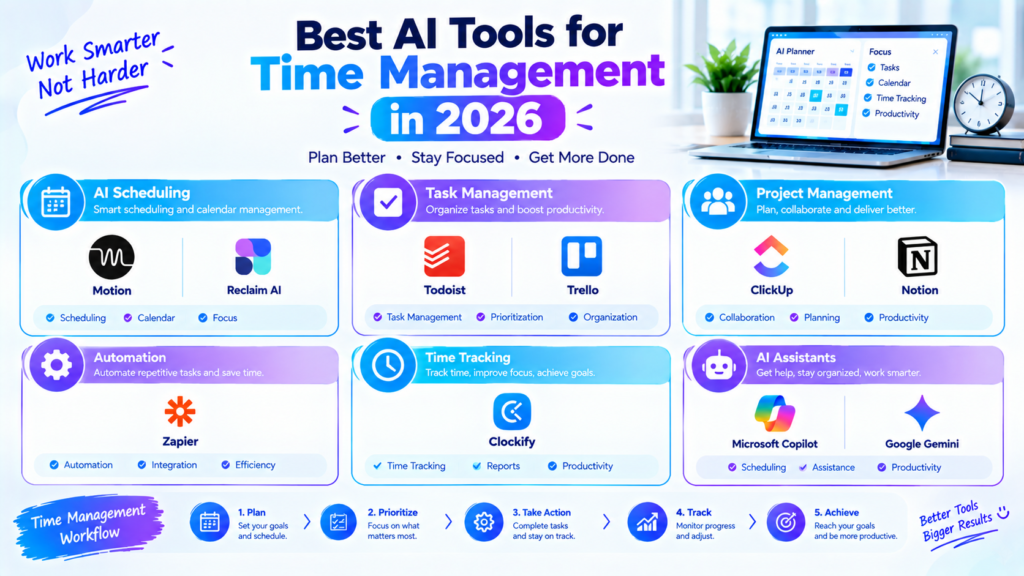
Here are some useful AI-powered tools and platforms for managing tasks, schedules, projects, and daily productivity.
1. Motion
Motion is designed around AI-powered scheduling and task management. It can help users organize tasks and calendars into a structured daily schedule.
Instead of manually deciding when every task should be completed, AI-based scheduling can help arrange work around deadlines and available time.
Motion can be useful for:
- Daily planning
- Task scheduling
- Calendar management
- Project planning
- Meeting organization
- Deadline management
It can be particularly useful for professionals and people managing multiple projects.
2. Reclaim AI
Reclaim AI focuses on intelligent calendar management. It can help users organize tasks, habits, meetings, and personal activities around their existing schedules.
One useful concept is protecting time for important activities instead of allowing every available calendar slot to be filled with meetings.
Reclaim can be useful for professionals who need to balance meetings, focused work, recurring tasks, and personal routines.
3. ClickUp
ClickUp combines task management, project management, documentation, and AI-powered productivity features.
Its AI capabilities can assist with tasks such as summarizing information, generating content, organizing project-related work, and helping teams work with large amounts of information.
For time management, ClickUp can be useful when your schedule is connected to larger projects and team responsibilities.
It can help users keep tasks, deadlines, projects, and communication in one workspace.
4. Notion
Notion is a popular workspace for notes, databases, project management, documentation, and planning.
With its AI features, users can work with information inside their workspace and use AI assistance for tasks such as summarization, writing, and organization.
You can create a personal productivity system in Notion that includes:
- Daily tasks
- Weekly goals
- Project lists
- Meeting notes
- Content calendars
- Study schedules
- Personal planning
This makes Notion useful for people who want both organization and AI assistance in one place.
5. Todoist
Todoist is a task management application designed to help users organize their personal and professional tasks.
Its productivity features can make it easier to capture tasks, organize projects, establish priorities, and manage deadlines.
For people who prefer a simple task-based system, Todoist can be a practical option.
You can organize tasks into categories such as:
- Today
- This week
- Work
- Personal
- Projects
- Important tasks
Adding AI assistance to a structured task-management workflow can make planning more efficient.
6. Trello
Trello uses boards, lists, and cards to help users organize projects and tasks.
AI-powered features can assist with creating and organizing content within project workflows.
Trello can be especially useful for visual thinkers who prefer seeing tasks move through stages such as:
Ideas → To Do → In Progress → Review → Completed
This approach can make project progress easier to understand.
7. Zapier
Zapier is primarily an automation platform, but it can play an important role in time management.
Instead of manually performing repetitive actions across different applications, users can create automated workflows.
For example, an automation might:
New form submission → Create task → Send notification → Add information to a spreadsheet
Automating small repetitive processes can save time over the course of a week or month.
8. Clockify
Clockify is a time-tracking tool that helps users understand how they spend their working hours.
Time tracking can be particularly useful for freelancers, remote workers, teams, and professionals who bill clients based on hours.
You can use time-tracking data to identify:
- How long projects take
- Where most working time goes
- Which activities consume too much time
- How much time is spent on different clients
- Whether your estimates are realistic
Understanding where your time goes is an important part of improving time management.
9. Microsoft Copilot
Microsoft Copilot can assist with productivity and work-related tasks within Microsoft’s ecosystem, depending on the product and plan being used.
It can help users summarize information, organize work, draft content, and assist with tasks inside supported Microsoft applications.
For people who already use Microsoft tools for work, an integrated AI assistant can make everyday productivity workflows more convenient.
10. Google Gemini
Google Gemini can assist with planning, brainstorming, summarization, writing, and other productivity tasks.
Users can use AI assistance to break larger goals into smaller tasks, create planning ideas, or organize information.
For example, you could ask an AI assistant to turn a large project into a series of manageable steps and then add those steps to your preferred task-management system.
Best AI Time Management Tools for Different Users
Different users have different time-management needs.
For Professionals
Motion, Reclaim AI, ClickUp, and Microsoft Copilot can be useful for managing projects, meetings, tasks, and workplace activities.
For Freelancers
Freelancers may benefit from a combination of Motion, Todoist, Clockify, and Zapier.
These tools can help with scheduling, task management, time tracking, and workflow automation.
For Students
Students can use Notion, Todoist, and AI assistants such as ChatGPT or Gemini to organize assignments, study sessions, projects, and deadlines.
For Remote Workers
Remote workers often need to manage meetings, focused work, and personal schedules. Calendar and task-management tools can help create clearer boundaries between different types of work.
For Content Creators
Content creators can use Notion, ClickUp, Todoist, and automation tools to manage content ideas, writing, editing, publishing, and social media tasks.
How to Use AI for Better Time Management
Simply installing an AI productivity tool will not automatically improve your time management. You need a practical system.
Step 1: List Your Tasks
Start by writing down everything you need to accomplish.
For example:
- Write article
- Answer emails
- Attend meeting
- Complete project
- Exercise
- Study
- Review notes
Getting everything out of your head makes planning easier.
Step 2: Identify Priorities
Separate tasks based on urgency and importance.
A simple system can be:
High Priority: Must be completed today.
Medium Priority: Important but can wait.
Low Priority: Useful but not urgent.
AI can help organize tasks, but you should make the final decision about what matters most.
Step 3: Estimate the Time
Give each important task an estimated duration.
For example:
- Email: 30 minutes
- Article research: 60 minutes
- Writing: 90 minutes
- Meeting: 45 minutes
This prevents you from creating an unrealistic schedule.
Step 4: Create Time Blocks
Instead of working from a huge to-do list, assign specific periods to important activities.
For example:
9:00–10:00: Research
10:00–11:30: Writing
11:30–12:00: Email
1:00–2:00: Project work
Time blocking can make your day easier to manage.
Step 5: Leave Some Flexibility
Do not fill every minute of your calendar.
Unexpected calls, technical problems, urgent tasks, and delays can happen. Leaving some free time makes your schedule more realistic.
Step 6: Review Your Day
At the end of the day, check what you completed and what remains.
Move unfinished tasks to another suitable time instead of allowing your entire schedule to become disorganized.
AI Time Management Workflow
A simple AI-powered workflow can look like this:
Capture Tasks → Prioritize → Estimate Time → Schedule → Focus → Track → Review
First, capture everything you need to do. Then prioritize the tasks, estimate how long they will take, and create a realistic schedule.
During the day, focus on your planned tasks and track your progress. At the end of the day, review what worked and adjust your next schedule.
Common Time Management Mistakes
AI tools can help, but they cannot fix every productivity problem.
Trying to Do Too Much
Adding too many tasks to your daily schedule can create unnecessary pressure.
Constantly Checking Notifications
Notifications can interrupt focused work and make simple tasks take longer.
Skipping Breaks
Working continuously for long periods can make it harder to maintain concentration.
Poor Task Prioritization
If every task is marked as urgent, it becomes difficult to know what actually needs attention first.
Over-Automation
Automation can save time, but setting up complicated systems for simple tasks may sometimes create more work than it removes.
Tips for Getting Better Results From AI Productivity Tools
Use these practices to build a better time-management system:
- Keep your task list realistic.
- Set clear deadlines.
- Prioritize important work.
- Use calendar blocks for focused tasks.
- Track how you actually spend your time.
- Automate repetitive activities.
- Review your schedule regularly.
- Keep some free time for unexpected work.
- Avoid unnecessary meetings and interruptions.
- Adjust your system based on what works for you.
Can AI Completely Manage Your Time?
AI can assist with many parts of time management, but it should not completely control your schedule.
Your priorities can change based on personal responsibilities, deadlines, business decisions, and unexpected events. An AI system may not understand all of these factors.
The most practical approach is to let AI handle organization and repetitive planning while you remain responsible for important decisions.
Final Thoughts
The best AI tools for time management in 2026 can help users organize tasks, schedule activities, track time, automate repetitive work, and create more structured workflows.
Tools such as Motion, Reclaim AI, ClickUp, Notion, Todoist, Trello, Zapier, Clockify, Microsoft Copilot, and Google Gemini offer different approaches to productivity and time management.
You do not need to use every tool. Start with one system that matches your needs and build a simple workflow around it.
The goal of AI-powered time management is not to fill every minute of your day. It is to help you spend your available time on the tasks that matter most while reducing unnecessary manual work.