Artificial intelligence is changing the modern workplace. Tasks that once required hours of manual effort can now be completed with the help of AI-powered tools. From writing emails and summarizing documents to managing projects, researching information, taking meeting notes, and automating repetitive tasks, AI can support many areas of professional work.
In 2026, AI is no longer limited to technical teams or large companies. Freelancers, remote workers, office professionals, entrepreneurs, marketers, content creators, and small business owners can all use AI tools to improve their daily workflows.
However, there are thousands of AI tools available, and not every tool is designed for the same purpose. Some are better for writing, some for research, some for meetings, while others focus on project management, design, or automation.
This guide explores some of the best AI tools for work in 2026 and explains how they can help professionals save time and improve their workflows.
What Are AI Tools for Work?
AI tools for work are software applications that use artificial intelligence to assist with professional tasks.
These tools can help users generate content, analyze information, organize projects, summarize documents, create presentations, manage meetings, and automate repetitive processes.
For example, instead of manually writing a routine email, you can use an AI assistant to create a first draft. Instead of reading a long meeting transcript, an AI tool can summarize the main points and action items.
The goal is not necessarily to replace human workers. Instead, AI can act as a digital assistant that helps people complete certain tasks more efficiently.
Why Use AI Tools for Work in 2026?
Modern professionals often have to handle many different responsibilities at the same time.
A typical workday may include:
- Checking emails
- Attending meetings
- Writing documents
- Researching information
- Managing projects
- Creating presentations
- Communicating with clients
- Updating spreadsheets
- Creating content
- Organizing tasks
AI can help with some of these activities and reduce the amount of repetitive manual work.
Some potential benefits include:
- Saving time
- Improving workflow organization
- Creating first drafts faster
- Summarizing large amounts of information
- Generating ideas
- Supporting research
- Automating repetitive processes
- Improving written communication
- Helping manage projects
The key is to use AI where it provides practical value rather than adding unnecessary technology to your workflow.
Best AI Tools for Work in 2026
1. ChatGPT
ChatGPT is a general-purpose AI assistant that can support a wide range of professional tasks.
You can use it to brainstorm ideas, write and edit documents, create email drafts, summarize text, prepare outlines, generate checklists, analyze information, and organize projects.
For example, a marketing professional could use ChatGPT to brainstorm campaign ideas. A freelancer could use it to prepare a proposal. A manager could use it to create a meeting agenda.
Its flexibility makes it useful for professionals who need assistance with different types of tasks throughout the day.
However, AI-generated information should always be reviewed before being used for important professional decisions.
2. Microsoft Copilot
Microsoft Copilot is designed to provide AI assistance within Microsoft’s ecosystem.
For professionals who regularly work with documents, spreadsheets, presentations, emails, and other Microsoft applications, AI assistance can become part of an existing workflow.
It can help with tasks such as drafting content, summarizing information, analyzing documents, and generating ideas, depending on the specific Microsoft product and Copilot version.
This can reduce the need to constantly switch between different applications.
For organizations already using Microsoft products, integrated AI features can be particularly relevant to everyday office work.
3. Google Gemini
Google Gemini is another AI assistant that can help professionals with writing, brainstorming, research, summarization, and information processing.
It can be useful for people who work heavily within Google’s ecosystem.
Professionals can use AI assistance to create drafts, understand information, generate ideas, and organize work.
As with other AI assistants, the exact capabilities available can depend on the current plan, product, and region.
4. Grammarly
Professional communication often involves writing emails, reports, proposals, articles, and messages.
Grammarly provides AI-powered writing assistance that can help users improve grammar, clarity, tone, and overall writing.
It can be useful for professionals who communicate with clients, colleagues, customers, or managers on a regular basis.
Instead of spending a long time checking every sentence manually, users can receive suggestions while writing.
However, professional writing should still be reviewed by the user to ensure that the tone and meaning are appropriate.
5. Notion AI
Notion combines notes, documents, databases, project management, and workspace organization.
Its AI capabilities can assist with tasks such as summarizing information, improving written content, brainstorming, and working with information stored in a workspace.
For freelancers and teams, Notion can provide a central place for project information, meeting notes, documentation, content calendars, and task management.
Combining organization and AI assistance can make it easier to manage information without constantly moving between different applications.
6. Perplexity
Research is an important part of many professional jobs.
Perplexity is an AI-powered search and research tool that can help users explore topics and find information through conversational queries.
It can be useful when researching competitors, learning about a new industry, exploring a technology, or preparing background information for a project.
Instead of manually searching through numerous pages, users can ask questions and explore related information through follow-up queries.
For important professional research, however, always verify significant claims using reliable original sources.
7. Otter.ai
Meetings can consume a large portion of the workday, especially for remote teams.
Otter.ai provides AI-powered transcription and meeting assistance that can help users capture and review conversations.
Instead of trying to write down every important point while participating in a meeting, users can review the transcript or summary afterward.
This can be useful for:
- Team meetings
- Client calls
- Interviews
- Online meetings
- Research discussions
AI meeting tools can help turn conversations into information that is easier to review and organize.
8. ClickUp AI
ClickUp is a project management platform that includes AI features.
It allows teams to manage tasks, projects, documents, and workflows in one environment.
AI can assist with certain writing, organization, and project-related tasks depending on the available features.
For teams managing multiple projects, combining task management and AI assistance can reduce some manual work.
It can also help teams keep project information organized in one central workspace.
9. Canva AI
Many professionals need to create visual content even if they are not professional designers.
Canva provides design tools and AI-powered features that can help users create presentations, social media graphics, marketing materials, blog images, and other visual content.
For marketers, freelancers, entrepreneurs, and content creators, AI-assisted design can reduce the time required to create visual assets.
Users can start with an idea and use Canva’s tools to turn it into a visual design.
10. Zapier
Automation is one of the most useful applications of AI in professional workflows.
Zapier connects different applications and allows users to automate repetitive processes.
For example, a business could create a workflow that transfers information from one application to another when a particular event occurs.
AI can also be incorporated into some workflows to process information or perform specific actions automatically.
Automation is particularly useful for repetitive tasks that happen frequently.
11. QuillBot
QuillBot provides AI-powered writing and rewriting tools.
Professionals can use it to rephrase text, summarize information, and improve certain types of written content.
It can be useful when editing drafts or trying to make written communication clearer.
However, users should make sure that rewritten content accurately represents their intended meaning and does not improperly reproduce someone else’s work.
AI Tools for Different Types of Work
Different professionals have different requirements.
For Freelancers
Freelancers can use AI tools for proposals, client emails, research, content creation, project planning, and administrative tasks.
A combination of an AI assistant, writing tool, project management platform, and automation tool can support many freelance workflows.
For Remote Workers
Remote workers can benefit from AI meeting transcription, task management, writing assistance, research, and communication tools.
AI meeting tools can be particularly helpful when teams have multiple online meetings every week.
For Marketers
Marketers can use AI for brainstorming, content planning, copywriting, research, visual creation, and campaign ideas.
However, human creativity and brand knowledge remain important when creating final marketing content.
For Small Business Owners
Small businesses can use AI for customer communication, marketing, content creation, research, project organization, and automation.
AI can help small teams handle some tasks that would otherwise require significant manual effort.
For Content Creators
Content creators can use AI for topic research, brainstorming, outlines, editing, image creation, and content repurposing.
The creator should remain responsible for the accuracy, originality, and quality of the final content.
How to Choose the Right AI Tool for Work
With so many options available, choosing the right AI tool can be difficult.
Start by identifying the task that consumes the most time.
If you spend too much time writing emails, look for a writing assistant.
>If research takes too long, consider an AI research tool.|
If meetings create too many notes, an AI transcription tool may help.
>If your team struggles with project organization, consider an AI-powered project management platform.
>If repetitive digital tasks consume your time, explore automation tools.
The best tool is usually the one that solves a real problem in your workflow.
Check Integration Options
An AI tool becomes more useful when it works with the applications you already use.
For example, if your team uses Microsoft products every day, integrated AI features may be more convenient than constantly switching to another platform.
Similarly, teams using Google services may prefer tools that fit naturally into that environment.
Consider Cost and Usage Limits
Many AI tools offer free plans, trials, or limited access.
Before selecting a tool for professional use, check:
- Pricing
- Usage limits
- Available features
- Team support
- Integrations
- Data policies
- Export options
A free plan may be enough for occasional users, while professionals with heavy workloads may need additional features.
Tips for Using AI at Work
1. Use AI for Repetitive Tasks
Look for tasks that you perform repeatedly.
Examples include creating similar reports, summarizing documents, organizing information, and preparing routine messages.
These tasks may be good candidates for AI assistance.
2. Give Clear Instructions
The quality of an AI response often depends on the information you provide.
Instead of giving a very short instruction, explain the goal, audience, format, tone, and important details.
Clear prompts can make AI output more useful.
3. Review the Final Output
Never assume that AI-generated content is automatically correct.
Check facts, numbers, names, calculations, and important claims before using the output professionally.
4. Protect Confidential Information
Be careful when entering sensitive company, customer, financial, or personal information into AI services.
Understand the tool’s data practices and your organization’s policies before using AI with confidential information.
5. Do Not Over-Automate
Automation can save time, but not every task should be automated.
Tasks involving important decisions, sensitive communication, or complex judgment may still require human review.
Final Thoughts
The best AI tools for work in 2026 can help professionals save time, organize information, improve communication, conduct research, manage projects, and automate repetitive tasks.
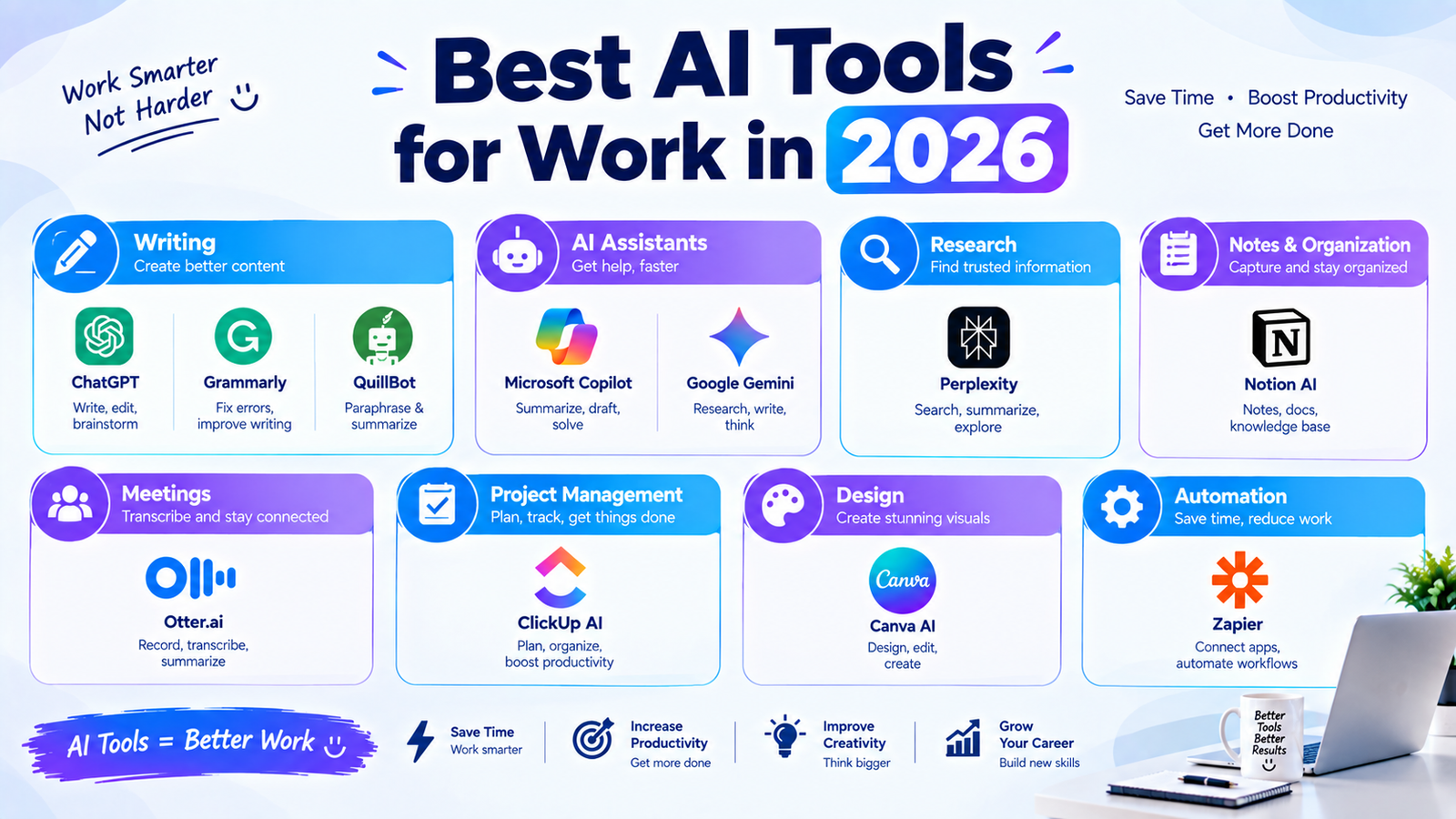
Tools such as ChatGPT, Microsoft Copilot, Google Gemini, Grammarly, Notion AI, Perplexity, Otter.ai, ClickUp AI, Canva AI, Zapier, and QuillBot each serve different purposes.
You do not need to use every tool. Start by identifying one specific problem in your workflow and choose an AI solution that can help solve it.
Use AI as a productivity assistant, review its output carefully, and keep human judgment involved in important decisions.
When used thoughtfully, AI can become a valuable part of the modern workplace and help professionals spend less time on repetitive tasks and more time on meaningful work.