Creating content consistently can be challenging. Whether you are a blogger, YouTuber, social media creator, marketer, freelancer, or business owner, producing high-quality content requires time, creativity, research, editing, and organization.
Artificial intelligence is changing the content creation process. AI tools can help creators brainstorm ideas, write drafts, research topics, create images, edit videos, generate social media posts, and organize content calendars.
In 2026, content creators have access to a growing range of AI-powered tools designed for different parts of the creative workflow. Instead of doing every task manually, creators can use AI to handle repetitive work and spend more time improving their ideas and connecting with their audience.
In this guide, we will explore some of the best AI tools for content creators in 2026 and explain how they can be used effectively.
Why Content Creators Need AI Tools
Content creation involves much more than simply publishing a post.
A creator may need to find a topic, research the subject, create an outline, write a script, design graphics, edit videos, create captions, optimize content for search engines, and promote the final piece.
Doing all of these tasks manually can take many hours.
AI tools can help simplify this process. For example, an AI writing assistant can help develop an article outline, while an image-generation tool can help create visual concepts. An AI video editor can speed up editing, and an AI research tool can help organize information.
The goal is not to replace creativity. Instead, AI can support creators by reducing repetitive work and providing useful starting points.
1. ChatGPT
ChatGPT is one of the most flexible AI tools available to content creators.
It can assist with brainstorming, writing, research planning, scripting, editing, content calendars, social media ideas, and much more.
A blogger can use ChatGPT to brainstorm article topics and create an outline. A YouTuber can use it to develop video concepts and scripts. A social media creator can ask it for caption ideas and content themes.
Content creators can use ChatGPT for:
- Blog post ideas
- YouTube video ideas
- Social media captions
- Video scripts
- Content outlines
- Email newsletters
- Content calendars
- Brainstorming
- Editing and rewriting
- Audience-focused ideas
The important thing is to provide clear instructions and then review the generated content before publishing.
2. Google Gemini
Google Gemini can help content creators with brainstorming, writing, summarization, research-related tasks, and idea development.
Creators who already use Google’s ecosystem may find it useful for workflows involving documents and other Google services, depending on available features and plans.
For example, a creator can use an AI assistant to generate possible headlines, summarize research notes, or develop ideas for a video series.
Gemini can also be useful when creators need multiple ideas quickly and want to compare different approaches before creating the final content.
3. Canva
Visual content is extremely important for modern creators.
Canva provides design tools and AI-powered features that can help creators produce social media graphics, presentations, thumbnails, posters, marketing materials, and other visual assets.
A creator does not necessarily need advanced graphic design skills to create professional-looking visuals.
Canva can be useful for:
- YouTube thumbnails
- Instagram posts
- Blog graphics
- Pinterest designs
- Presentations
- Social media banners
- Marketing graphics
- Short-form visual content
AI-assisted design features can help speed up the creative process, while templates provide a useful starting point.
4. Adobe Firefly
Adobe Firefly is designed for generative creative work and can be useful for creators who need AI-assisted images and design elements.
Content creators can use generative features to explore visual concepts, create graphics, and develop ideas for creative projects.
For example, a blogger creating an article about technology could use generative tools to develop a suitable visual concept.
AI image generation can be particularly helpful when a creator needs a unique visual idea but does not have access to professional photography.
However, creators should always understand the tool’s current usage rights and licensing conditions before using generated assets commercially.
5. Grammarly
Writing quality matters for almost every type of content.
Grammarly provides writing assistance that can help creators improve grammar, spelling, clarity, tone, and overall readability.
Bloggers can use it to review articles. YouTubers can check scripts. Social media managers can improve captions and marketing copy.
AI writing assistance is especially useful during the editing stage because creators can focus on their ideas first and refine the language afterward.
6. Perplexity
Research is an important part of content creation.
Perplexity can help users explore topics, ask questions, find information, and organize research.
For content creators, research assistance can be useful when preparing articles, videos, newsletters, and educational content.
A creator can use an AI research tool to identify important subtopics and questions that should be addressed in a piece of content.
However, AI-generated research should not automatically be treated as accurate. Important facts, statistics, quotations, and claims should be checked against reliable original sources.
<h2>7. CapCut
Video has become one of the most important content f
ormats for creators.
CapCut provides video editing tools with features designed to simplify editing for short-form and other video content.
Creators can use video editing tools for:
- TikTok videos
- YouTube Shorts
- Instagram Reels
- Promotional videos
- Educational videos
- Social media clips</p>
AI-powered features can help with tasks such as captions, editing, effects, and other production steps depending on the current version and plan.
This can help creators produce videos more efficiently without needing advanced editing skills.
8. Descript
Descript takes a text-based approach to audio and video editing.
This can be useful for podcasters, YouTubers, interview creators, and other professionals who work with spoken content.
Instead of treating video editing as purely a timeline-based process, creators can work with transcribed text to make certain edits easier.
For example, a creator can review a transcript and remove unnecessary sections from a recorded conversation.
This can make editing interviews, podcasts, tutorials, and talking-head videos more efficient.
9. ElevenLabs
Voice and audio are important for many types of digital content.
ElevenLabs provides AI-powered voice technology that can be used for various audio and voice-related applications.
Content creators may use AI voice tools for narration, demonstrations, prototypes, and other creative projects, depending on the applicable terms and permissions.
Creators should pay particular attention to consent and voice rights when using voice-cloning or voice-generation features. A person’s voice should not be reproduced without appropriate authorization.
10. QuillBot
QuillBot is an AI-powered writing and paraphrasing tool that can help creators rewrite and improve text.
It can be useful when a creator wants to make a sentence clearer, explore alternative wording, or improve the flow of existing content.
For example, a blogger might use it during the editing process to identify repetitive phrasing.
However, rewriting tools should be used to improve original work rather than to copy or disguise someone else’s content.
11. Notion AI
Content creators need organization as much as creativity.
Notion can help creators manage notes, content ideas, project information, calendars, and workflows. Its AI features can assist with summarization, writing, brainstorming, and information organization.
A creator can maintain a content database containing:
- Article ideas
- Video topics
- Publishing dates
- Research notes
- Social media ideas
- Brand information
- Collaboration details
This can make it easier to maintain a consistent publishing schedule.
12. Otter.ai
Creators who conduct interviews, podcasts, meetings, or research conversations can benefit from transcription tools.
Otter.ai can help convert spoken conversations into text, making it easier to review discussions later.
For example, a blogger interviewing an expert could use transcription to create a written record of the conversation and then identify useful points for an article.
Creators should still review transcripts because automated transcription can contain errors.
Best AI Tools for Different Types of Content
Different creators need different tools.
For Bloggers
Useful options include:
- ChatGPT
- Grammarly
- Perplexity
- QuillBot
- Notion AI
These tools can support topic research, outlines, writing, editing, and organization.
For YouTubers
YouTubers may find these tools useful:
- ChatGPT
- Canva
- CapCut
- Descript
- ElevenLabs
They can support scripting, thumbnails, video editing, captions, and audio production.
For Social Media Creators
Useful options include:
- ChatGPT
- Canva
- CapCut
- Grammarly
- Adobe Firefly
These tools can help with captions, graphics, short videos, content ideas, and visual concepts.
For Podcasters
Podcasters can use:
- ChatGPT
- Descript
- Otter.ai
- ElevenLabs
These tools can support planning, transcription, editing, and audio-related workflows.
How AI Can Improve the Content Creation Process
AI becomes more useful when it is integrated into a complete workflow.
Instead of asking AI to create everything from beginning to end, break the process into smaller steps.
Start by choosing a topic.
Then use AI to brainstorm related ideas and questions.
Next, conduct research and verify important information.
Create an outline and develop the content.
After that, use writing and editing tools to improve clarity.
Create visuals using design or image tools.
For video content, edit the footage and add captions.
Finally, review everything before publishing.
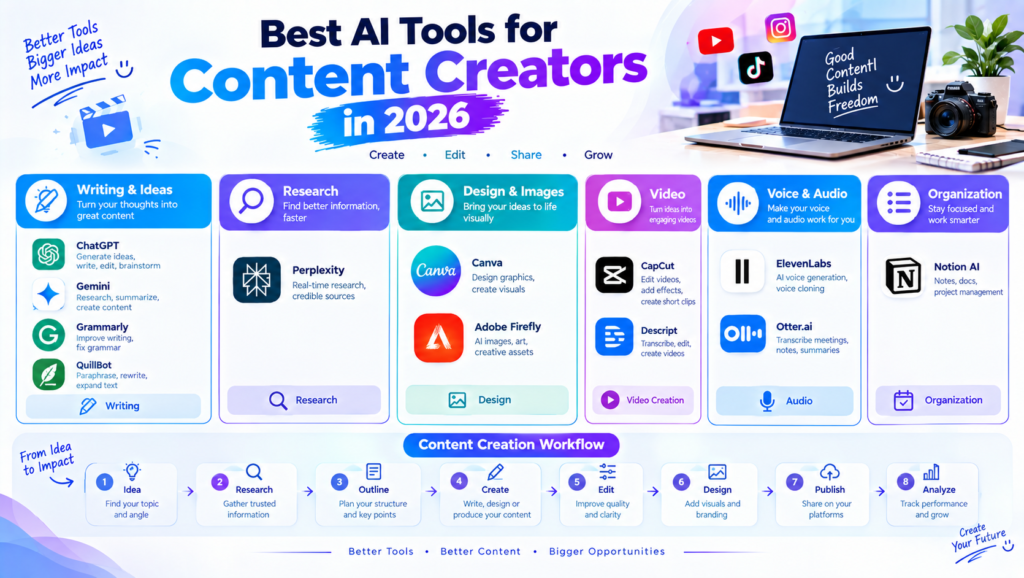
A simple workflow looks like this:
Idea → Research → Outline → Create → Edit → Design → Publish → Analyze</strong>
This approach allows AI to support different stages while the creator remains responsible for the final result.
Benefits of Using AI for Content Creation
<h3>Saves Time
AI can speed up repetitive tasks such as brainstorming, summarizing, formatting
, and basic editing.</p>
Generates Ideas
Creators can use AI when they feel stuck or n
eed multiple content concepts.
Improves Productivity
Automating smaller tasks can give creators more time for important creative work.
Supports Different Formats
The same topic can be transformed into an article, video script, social media post, newsletter, or infographic.
Helps Small Creators
Individual creators often have limited budgets and resources. AI tools can provide assistance with tasks that might otherwise require several different specialists.
Things Content Creators Should Avoid
AI is powerful, but using it incorrectly can reduce content quality.
Do Not Publish Everything AI Generates
AI-generated content may contain factual errors, repetitive language, or inaccurate information.
Always review and edit the final result.
Do Not Copy Other Creators
AI should help you develop original content rather than reproduce someone else’s work.
Do Not Ignore Your Audience
AI can generate technically correct content, but it does not automatically understand your audience as well as you do.
Use your own experience and audience knowledge to guide the final content.
Do Not Use Unverified Facts
Research tools can sometimes provide incorrect or incomplete information.
Verify important claims using trustworthy sources.</p>
Do Not Overuse AI
If every part of your content feels autom
ated, it may lose personality.
Your experience, opinions, examples, storytelling, and creative perspective can make content more valuable.
How to Choose the Right AI Tool
You do not need every AI tool available.
Start by identifying your biggest challenge.
>If writing takes too long, consider an AI writing assistant.
>If designing graphics is difficult, try an AI-powered design platform.
>If video editing takes too much time, consider an AI video editor.
>If research is difficult, use an AI research assistant alongside reliable sources.
>Also consider pricing, ease of use, integrations, privacy, commercial usage rights, and the quality of the results.
Final Thoughts
AI tools are becoming an important part of modern content creation. In 2026, creators can use AI for brainstorming, research, writing, design, video editing, audio production, organization, and many other tasks.
Tools such as ChatGPT, Gemini, Canva, Adobe Firefly, Grammarly, Perplexity, CapCut, Descript, ElevenLabs, QuillBot, Notion AI, and Otter.ai can support different parts of the creative workflow.
The best approach is to use AI as an assistant rather than depending on it completely.
Your creativity, experience, research, and understanding of your audience should remain at the center of your content. When AI handles repetitive tasks and you focus on ideas and quality, the overall content creation process can become faster and more organized.