
Artificial intelligence is changing the way people work, study, organize information, and manage everyday tasks. Instead of spending hours on repetitive work, users can now rely on AI-powered tools to write content, summarize information, organize tasks, create notes, conduct research, and automate routine processes.
In 2026, AI productivity tools are becoming useful for almost every type of user. Students can use them to organize their learning, freelancers can manage client work, professionals can save time on daily tasks, and business owners can automate parts of their workflow.
However, there are hundreds of AI tools available, and choosing the right one can be confusing. Some tools are designed for writing, while others focus on meetings, research, project management, automation, or communication.
In this guide, we will explore some of the best AI productivity tools in 2026 and explain how each type of tool can help you work more efficiently.
What Are AI Productivity Tools?
AI productivity tools are applications that use artificial intelligence to help users complete tasks faster or with less manual effort.
Traditional productivity software usually requires users to perform most tasks themselves. AI-powered productivity software can assist with tasks such as generating text, summarizing documents, analyzing information, organizing data, creating plans, and automating repetitive actions.
For example, instead of manually turning a long meeting transcript into a short summary, an AI tool can analyze the transcript and create a structured summary in seconds.
The main purpose is not necessarily to replace human work. Instead, AI can reduce repetitive work and give users more time to focus on important tasks that require human judgment and creativity.
Why Use AI for Productivity in 2026?
Modern work often involves managing emails, meetings, documents, messages, research, deadlines, and multiple projects at the same time.
AI can help simplify many of these activities.
Some common benefits include:
- Saving time on repetitive tasks
- Creating first drafts faster
- Summarizing long documents
- Organizing information
- Generating ideas
- Managing tasks and projects
- Improving written communication
- Automating routine workflows
- Finding information more efficiently
- Reducing time spent switching between different tasks
The biggest benefit depends on how you use the technology. An AI tool is most useful when it solves a specific problem in your daily workflow.
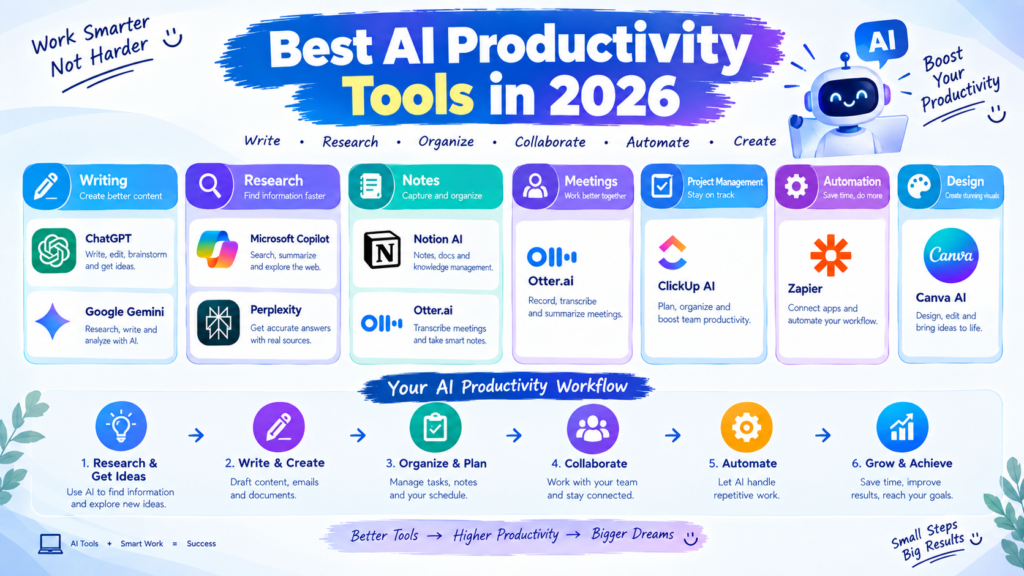
Best AI Productivity Tools in 2026
1. ChatGPT
ChatGPT is one of the most versatile AI tools for productivity. It can help users brainstorm ideas, write and edit content, summarize information, create plans, explain complicated topics, analyze text, and assist with many other everyday tasks.
For professionals, it can help create emails, meeting summaries, reports, outlines, project ideas, and research questions.
Freelancers can also use it for proposals, content planning, client communication, and brainstorming.
The key advantage is its flexibility. Instead of being designed for just one task, it can support many different workflows.
2. Google Gemini
Google Gemini can be useful for users who already work heavily with Google’s ecosystem.
It can assist with writing, brainstorming, research, summarization, and information organization. Depending on the available features and integrations, AI assistance can also fit into common Google-based workflows.
For people who spend a lot of time working with documents, email, and other productivity services, an AI assistant connected to their existing workflow can reduce the need to move information between different applications.
3. Microsoft Copilot
Microsoft Copilot is designed to bring AI assistance into Microsoft’s productivity ecosystem.
It can be useful for people working with documents, spreadsheets, presentations, emails, and other business tasks.
One major advantage of AI inside productivity software is that users can work with familiar applications instead of constantly switching between separate AI websites.
For office workers and organizations already using Microsoft products, this type of integration can make AI particularly useful for everyday productivity.
4. Notion AI
Notion is widely used for notes, project management, documentation, and organization, while Notion AI adds AI capabilities to that workspace.
Users can use AI assistance to summarize notes, improve writing, generate ideas, and work with information stored in their workspace.
For people who want one place for notes, tasks, projects, and documentation, combining a workspace with AI assistance can make information management easier.
It can be especially useful for freelancers, teams, content creators, and people managing multiple projects.
5. Grammarly
Writing is a major part of professional productivity, and Grammarly can help users improve written communication.
AI-powered writing assistance can help with grammar, clarity, tone, rewriting, and other aspects of communication.
This can be useful when writing emails, reports, articles, proposals, social media content, or professional messages.
Instead of spending a long time checking every sentence manually, users can use AI-powered suggestions as part of their editing process.
However, users should still review important documents themselves because AI suggestions are not always perfect.
6. Perplexity
Research can take a significant amount of time, especially when information is spread across many websites.
AI search and research tools such as Perplexity can help users find information and understand a topic more quickly.
Instead of simply producing a list of search results, AI-powered search tools can provide conversational answers and help users explore follow-up questions.
This can be useful for research, brainstorming, market research, learning about new subjects, and gathering information before starting a project.
For important research, however, users should verify important claims by checking the original sources.
7. Otter.ai
Meetings can create a large amount of information that is difficult to remember.
AI meeting assistants such as Otter.ai can help with transcription and meeting notes.
Instead of trying to write everything down during a meeting, users can focus on the conversation and review an AI-generated transcript or summary afterward.
This can be particularly useful for remote teams, interviews, business meetings, and online discussions.
The exact features available can vary by plan, so users should check the current offering before choosing a tool.
8. ClickUp AI
ClickUp is a project management and productivity platform that includes AI features.
It can help teams organize tasks, projects, documents, and workflows while using AI assistance for certain productivity activities.
For teams managing multiple projects, combining project management with AI can reduce the amount of manual organization required.
It can also help users turn information into actionable tasks and improve workflow organization.
9. Zapier
Automation is one of the most powerful areas of AI productivity.
Zapier allows users to connect different applications and automate workflows. AI capabilities can add another layer to these automations.
For example, a business might create a workflow where information from one application triggers an action in another application.
Automation is especially valuable for repetitive processes. Instead of manually performing the same steps every day, users can create a workflow that handles some of the process automatically.
10. Canva AI
Canva is useful for users who need to create visual content quickly.
Its AI-powered features can assist with design, writing, image creation, and other creative tasks depending on the current feature set.
For marketers, freelancers, bloggers, teachers, and content creators, AI-assisted design can reduce the time needed to create presentations, social media graphics, blog visuals, and other materials.
The main benefit is that users without advanced graphic design skills can create professional-looking content more efficiently.
How to Choose the Right AI Productivity Tool
You do not need to use every AI productivity tool available.
In fact, using too many tools can sometimes make productivity worse because you have to manage multiple accounts, interfaces, and workflows.
Start by identifying your biggest productivity problem.
If writing takes too much time, look for an AI writing assistant.
If meetings create too many notes, consider an AI meeting assistant.
If research takes too long, an AI research or search tool may help.
If repetitive tasks consume your time, explore automation tools.
If your work involves project management, consider an AI-powered project management platform.
The best tool is usually the one that fits naturally into your existing workflow.
Tips for Using AI Productivity Tools Effectively
1. Give Clear Instructions
AI tools generally perform better when you provide specific instructions.
Instead of asking:
“Write an email.”
You could provide the purpose, audience, tone, and important information that should be included.
Better instructions usually produce more useful results.
2. Always Review Important Information
AI can make mistakes, misunderstand information, or generate inaccurate information.
Before using AI-generated content for important business, academic, financial, or professional decisions, review and verify it.
3. Protect Sensitive Information
Avoid entering confidential business information, passwords, private customer data, or other sensitive information into an AI tool unless you understand how that service handles the data and have permission to use it.
4. Automate Repetitive Work
Look for tasks you perform repeatedly.
For example:
- Creating similar reports
- Sorting information
- Writing routine messages
- Organizing tasks
- Summarizing meetings
- Moving information between applications
These are often good candidates for AI assistance or automation.
5. Keep Human Judgment in the Process
AI should be treated as an assistant rather than an automatic decision-maker.
Use AI to generate ideas, organize information, and speed up repetitive work, but keep human review for important decisions and final outputs.
AI Productivity Tools for Different Users
Different users have different needs.
For Students
Students can use AI for organizing notes, creating study plans, summarizing information, generating practice questions, and understanding difficult concepts.
For Freelancers
Freelancers can use AI for proposals, client communication, brainstorming, research, content creation, and administrative tasks.
For Content Creators
Content creators can use AI for brainstorming topics, creating outlines, writing drafts, generating visuals, and repurposing content.
For Professionals
Office professionals can use AI for emails, documents, meeting notes, research, presentations, and task organization.
For Small Businesses
Small businesses can use AI for marketing, customer communication, content creation, research, workflow automation, and administrative work.
Final Thoughts
AI productivity tools are becoming an important part of modern digital work. In 2026, users have access to AI assistants for writing, research, meetings, project management, design, automation, and many other activities.
Tools such as ChatGPT, Gemini, Microsoft Copilot, Notion AI, Grammarly, Perplexity, Otter.ai, ClickUp, Zapier, and Canva can each solve different productivity problems.
However, you do not need dozens of applications to become more productive. Start with one or two tools that solve a real problem in your workflow. Learn how to use them effectively, review their output carefully, and gradually add other tools when there is a clear need.
The goal of AI productivity is not simply to use more AI. The goal is to save time, reduce repetitive work, organize information better, and spend more time on valuable tasks.