Taking notes is an important part of studying, working, attending meetings, researching, and organizing ideas. However, traditional note-taking can take a lot of time. You may spend an entire meeting writing notes instead of listening, or spend hours organizing information after a lecture or research session.
AI note-taking tools are changing this process. Modern AI tools can help you capture information, summarize long documents, organize ideas, transcribe meetings, and quickly find important details.
In 2026, there are many AI-powered note-taking options available for students, professionals, researchers, freelancers, and business teams. The right tool depends on what you need, whether that is simple note organization, meeting transcription, research assistance, or an all-in-one workspace.
In this guide, we will explore some of the best AI note-taking tools in 2026 and explain how they can help you work and learn more efficiently.
What Are AI Note-Taking Tools?
AI note-taking tools use artificial intelligence to help users create, organize, summarize, and manage information.
Instead of manually writing everything down, you can use AI to capture important information and turn it into structured notes.
Depending on the tool, features may include:
- Automatic meeting transcription
- AI-generated summaries
- Note organization
- Document summarization
- Searchable information
- Action-item extraction
- Content rewriting
- Question answering
- Research organization
- Task and project management
These features can make note-taking faster and easier while allowing you to focus on the information itself.
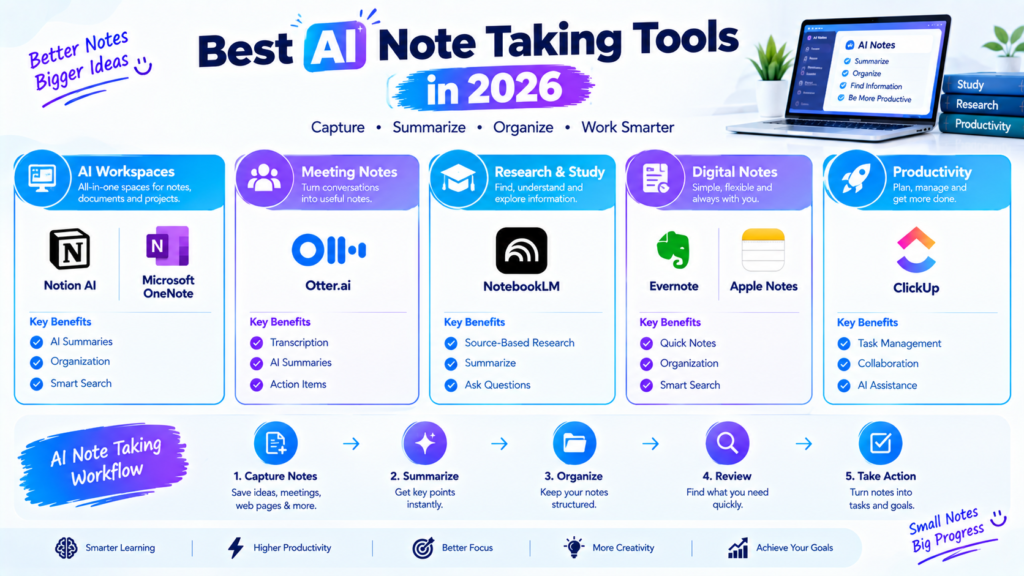
1. Notion AI
Notion is a popular workspace for notes, documents, databases, tasks, and project organization. With Notion AI, users can work with their notes and documents using AI-powered features.
You can use it to summarize notes, improve written content, generate ideas, organize information, and work with existing documents.
For students, Notion can be useful for organizing course notes, study materials, assignments, and research. Professionals can use it for project documentation, meeting notes, planning, and team knowledge.
Best for: Students, professionals, teams, and organized digital workspaces.
2. Microsoft OneNote with AI Features
Microsoft OneNote is a long-standing digital note-taking application that allows users to organize information into notebooks, sections, and pages.
When combined with Microsoft’s broader AI ecosystem, it can become part of an AI-assisted productivity workflow. Users can capture notes, organize information, and work with Microsoft tools to improve productivity.
OneNote can be especially useful for people already using Microsoft 365 for school or work.
Best for: Microsoft 365 users, students, and professionals.
3. Google Keep and Gemini
Google Keep is designed for quick notes, lists, reminders, and ideas. When used alongside Google’s AI ecosystem, including Gemini, users can create a more AI-assisted workflow for managing information.
This combination can be useful when you want to quickly capture an idea and then use AI to expand, organize, or develop it.
For everyday note-taking, simple tools like Keep can be convenient because they focus on quick access rather than complicated organization.
Best for: Quick notes, ideas, reminders, and Google users.
4. Otter.ai
Otter.ai is particularly useful for meetings, interviews, lectures, and conversations where manually writing notes can be difficult.
It can transcribe spoken conversations and help users review what was discussed. AI-powered summaries can make it easier to identify important information without going through an entire transcript.
For students, it can be useful for reviewing lectures. Professionals can use it for meetings and interviews, while teams can use transcripts to keep track of discussions.
Best for: Meetings, interviews, lectures, and voice-based notes.
5. NotebookLM
NotebookLM is designed around working with your own source materials. You can provide documents and other supported sources, then use AI to understand and explore that information.
This makes it particularly useful for research and study workflows.
For example, a student can use a collection of class materials to create summaries and ask questions about the provided information. A researcher can organize source material and use AI to explore important concepts.
The key benefit is that the workflow is centered around the sources you provide.
Best for: Research, studying, documents, and source-based note-taking.
6. Evernote
Evernote is a well-known digital note-taking and organization platform. It provides features for capturing notes, organizing information, searching content, and managing personal knowledge.
AI-assisted features can help users work with their notes more efficiently, depending on the current plan and available features.
Evernote can be useful for people who want a dedicated note-taking environment rather than using a general-purpose document or project management platform.
Best for: Personal knowledge management and organized digital notes.
7. ClickUp
ClickUp is primarily known as a project management and productivity platform, but its AI features can also support note-taking and information organization.
Teams can use it to combine notes, tasks, documents, projects, and communication in one workspace.
For professionals, this can be useful because meeting notes can be connected to tasks and projects rather than remaining as separate documents.
Best for: Teams, project management, and work-related notes.
8. Apple Notes
Apple Notes is a simple option for users within the Apple ecosystem. It allows users to capture text, images, documents, checklists, sketches, and other information.
When combined with Apple’s newer AI capabilities where supported, users can incorporate AI assistance into broader writing and organization workflows.
Its biggest advantage is simplicity and integration with Apple devices.
Best for: iPhone, iPad, and Mac users who want simple note-taking.
Key Features to Look For in an AI Note-Taking Tool
Before choosing an AI note-taking application, consider the features that matter most to you.
Automatic Summaries
If you regularly work with long meetings, lectures, or documents, automatic summaries can save significant time. Instead of reviewing everything, you can start with the main points.
Transcription
Transcription is especially useful for meetings, interviews, lectures, and brainstorming sessions. A good transcription workflow can turn spoken information into searchable text.
Smart Search
As your collection of notes grows, finding old information becomes increasingly important. AI-powered search can help you locate relevant information more naturally.
Organization
Look for features such as folders, tags, databases, notebooks, or linked documents. Good organization makes your notes easier to use later.
AI Chat
Some tools allow you to ask questions about your notes or documents. This can be useful when you need to quickly find information without manually searching through every page.
Collaboration
For teams, collaboration features are important. Shared notes, comments, documents, and task connections can make information easier to manage.
How Students Can Use AI Note-Taking Tools
Students can use AI note-taking tools for several parts of their academic workflow.
For example, you can use them to organize lecture notes, summarize study material, create revision points, and find information inside large collections of documents.
A simple workflow could look like this:
Attend Class → Capture Notes → Summarize → Organize → Review → Practice
AI should support the learning process rather than completely replace it. Students should still read their materials, check important information, and understand the subject themselves.
How Professionals Can Use AI Note-Taking Tools
Professionals often attend multiple meetings and handle large amounts of information every week.
AI note-taking tools can help by creating transcripts, summaries, action items, and organized documentation.
A useful workflow could be:
Meeting → Transcript → Summary → Action Items → Tasks → Follow-Up
This can reduce the amount of manual documentation required after meetings.
How Researchers Can Use AI Note-Taking Tools
Researchers often work with papers, reports, books, interviews, and other information sources.
AI-powered note-taking tools can help organize these materials and make important information easier to retrieve.
For research work, source-based tools can be particularly useful because they allow researchers to work with specific documents rather than relying only on general AI responses.
>However, researchers should always verify important claims against the original sources.
How Freelancers Can Use AI Note-Taking Tools
Freelancers can also benefit from AI note-taking tools.
Client meetings often contain project requirements, deadlines, revisions, and important instructions. Instead of trying to remember everything, freelancers can use meeting notes and summaries to organize the information.
For example:
Client Call → Capture Requirements → Summarize → Create Tasks → Complete Project
This can help freelancers stay organized when managing multiple clients.
Are AI Note-Taking Tools Free?
Some AI note-taking tools offer free plans or limited free features, while advanced features may require a paid subscription.
Free plans can be enough for casual users, but people who regularly need transcription, larger storage, advanced AI features, or team collaboration may need a paid plan.
Before choosing a tool, check its current pricing, usage limits, privacy policies, and available features.
Tips for Using AI Note-Taking Tools Effectively
AI can make note-taking easier, but the quality of your workflow still matters.
Here are some practical tips:
1. Keep Notes Organized
Create a consistent structure for your notes. Use clear titles, categories, folders, or tags.
2. Review AI Summaries
AI-generated summaries can occasionally miss context or misunderstand information. Review important notes before relying on them.
3. Keep Important Sources
For research and academic work, keep the original documents and sources alongside your AI-generated notes.
4. Protect Sensitive Information
Avoid uploading confidential business information, private client data, or sensitive documents unless you understand the tool’s privacy and data-handling policies.
5. Use AI as an Assistant
The goal is not to let AI do everything. Use it to reduce repetitive work while keeping yourself responsible for understanding and checking the information.
Final Thoughts
AI note-taking tools are becoming useful productivity solutions for students, professionals, researchers, freelancers, and teams.
>Tools such as Notion AI, Otter.ai, NotebookLM, Microsoft OneNote, Evernote, and ClickUp can support different types of note-taking and information management.
The best option for you depends on your workflow. The best option for you depends on your workflow. For meeting-heavy work, transcription may be your priority. Students and researchers may benefit more from source-based notes and document analysis. Meanwhile, people who manage projects may find tools that combine notes with tasks especially useful.
The important thing is to choose a tool that fits the way you already work and use AI to make your notes easier to capture, organize, understand, and revisit.