
Productivity is about making better use of your time, attention, and resources. However, modern work often involves emails, meetings, research, writing, planning, and repetitive tasks that can consume a large part of the day.
ChatGPT can act as an AI assistant for many of these activities. It can help you brainstorm ideas, organize tasks, create drafts, summarize information, build plans, and improve written content.
The goal is not to let AI make every decision for you. Instead, you can use ChatGPT to reduce repetitive work and make your workflow more organized.
In this guide, you will learn how to use ChatGPT for productivity, with practical examples that can be applied to work, studying, freelancing, content creation, and everyday tasks.
What Is ChatGPT?
ChatGPT is an AI assistant that can understand natural-language instructions and generate responses based on the information and instructions you provide.
For productivity, it can be used as a flexible assistant for tasks such as:
- Planning
- Writing
- Brainstorming
- Research
- Summarization
- Task organization
- Learning
- Content creation
- Data-related work
- Problem solving
Its usefulness depends heavily on the instructions and context you provide.
A clear prompt with specific requirements generally gives you a more useful starting point than a very vague request.
Why Use ChatGPT for Productivity?
There are several ways ChatGPT can support a productivity workflow.
Save Time
ChatGPT can help create first drafts, summaries, outlines, and ideas quickly.
Reduce Repetitive Work
If you frequently perform similar writing or organizational tasks, ChatGPT can help create reusable templates and workflows.
Organize Information
You can provide unstructured notes and ask ChatGPT to turn them into organized lists, tables, summaries, or action items.
Improve Writing
ChatGPT can help rewrite text, improve clarity, adjust tone, and identify areas that need improvement.
Generate Ideas
When you are stuck, ChatGPT can provide possible approaches, questions, topics, or starting points.
1. Use ChatGPT to Plan Your Day
One of the simplest ways to use ChatGPT for productivity is daily planning.
Start by creating a list of everything you need to accomplish.
For example:
- Answer emails
- Complete a report
- Research a topic
- Attend a meeting
- Write an article
- Review documents
Then provide the list to ChatGPT and explain your deadlines and priorities.
You can ask it to organize the tasks into a realistic daily schedule.
For example:
“I have six tasks to complete today. My most important deadline is at 4 PM. Create a realistic schedule with focused work sessions and short breaks.”
ChatGPT can give you a starting plan that you can then adjust according to your actual schedule.
2. Use ChatGPT to Create a To-Do List
A simple to-do list can become difficult to manage when it contains dozens of tasks.
ChatGPT can help organize your tasks into categories.
For example:
Urgent: Tasks that require immediate attention.
Important: Tasks that matter but have more flexibility.
Later: Tasks that can be completed at another time.
You can also ask ChatGPT to turn a large project into smaller tasks.
This makes a project easier to approach because you can focus on one step at a time.
3. Use ChatGPT for Time Management
Time management is another useful area for ChatGPT.
You can tell it how many hours you have available and provide your tasks.
For example:
“I have five hours available today. I need to write an article, answer emails, attend a meeting, and complete a report. Help me create a time-blocking schedule.”
ChatGPT can suggest a schedule based on the information you provide.
However, remember that an AI-generated schedule is only a suggestion. You should adjust it according to real deadlines, meetings, energy levels, and unexpected tasks.
4. Use ChatGPT to Write Emails Faster
Writing emails can take a surprising amount of time.
Instead of writing every email from scratch, you can give ChatGPT the key points and ask it to create a draft.
For example:
“Write a short professional email telling a client that the project will be completed two days later than originally planned. Keep the tone polite and transparent.”
ChatGPT can create a starting draft that you can review and personalize.
This is especially useful for repetitive business communication.
Always check the final email before sending it, particularly when it contains deadlines, commitments, pricing, or other important information.
5. Use ChatGPT for Content Creation
Bloggers and content creators can use ChatGPT throughout the content creation process.
A simple workflow can be:
Topic → Research Questions → Outline → Draft → Editing → SEO → Publishing
ChatGPT can assist with each stage.
For example, you can ask it to:
- Generate article ideas
- Create an outline
- Suggest headlines
- Write an introduction
- Improve paragraphs
- Generate FAQs
- Create social media ideas
- Rewrite content
However, adding your own expertise and original ideas is important. AI-generated content should be reviewed, edited, and fact-checked before publication.
6. Use ChatGPT for Brainstorming
Sometimes the hardest part of a task is getting started.
ChatGPT can act as a brainstorming partner.
For example, if you are creating a website about productivity, you can ask:
“Give me 20 blog topic ideas about AI and productivity for beginners. Focus on practical topics that solve everyday problems.”
You can then select the ideas that are most relevant to your audience.
You can also ask ChatGPT to develop one idea into several different content angles.
7. Use ChatGPT to Summarize Information
Long documents and large amounts of text can take considerable time to review.
When you have permission to process the material, ChatGPT can help summarize information you provide.
For example, you can ask for:
- A short summary
- Key points
- Action items
- Important questions
- A simplified explanation
- A structured outline
A useful prompt is:
“Summarize this document in five key points and list the action items separately.”
For important information, review the original document because summaries can omit context or details.
8. Use ChatGPT for Research
ChatGPT can be useful during the early stages of research.
You can use it to brainstorm:
- Research questions
- Subtopics
- Search terms
- Areas to investigate
- Possible explanations
For example, if you want to research AI in education, ChatGPT can help divide the subject into areas such as:
AI Study Tools → Personalized Learning → AI Tutors → Academic Research → Student Productivity → Challenges
This creates a useful research framework.
When accuracy matters, verify factual claims with reliable sources and consult original documents or authoritative references.
9. Use ChatGPT to Break Down Complex Projects
Large projects often become overwhelming because the final goal seems too big.
ChatGPT can help turn a large objective into smaller actions.
For example:
Launch a Blog
↓
Choose Niche
↓
Research Keywords
↓
Create Content Plan
↓
Write Articles
↓
Create Images
↓
Optimize SEO
↓
Publish
↓
Promote
Breaking the project into smaller steps makes it easier to track progress.
10. Use ChatGPT for Meeting Preparation
ChatGPT can also help prepare for meetings.
You can provide the meeting topic and ask it to generate:
- Questions to ask
- Topics to discuss
- Possible objections
- Talking points
- A meeting agenda
For example:
“Create a 30-minute meeting agenda for discussing a new website project. Include goals, priorities, deadlines, responsibilities, and next steps.”
This can help create a more structured meeting.
11. Use ChatGPT to Create Meeting Follow-Ups
After a meeting, you can use ChatGPT to organize notes that you provide.
For example, you can ask:
“Turn these meeting notes into a concise summary. Then create a separate list of action items with responsible people and deadlines.”
This transforms unstructured notes into something easier to follow.
Make sure the information you provide is appropriate to share with the AI service you are using, especially if it contains confidential business information.
12. Use ChatGPT for Learning
ChatGPT can also support learning and skill development.
You can ask it to explain a difficult concept at different levels.
For example:
“Explain search engine optimization to a complete beginner using simple examples.”
You can then ask follow-up questions or request practice exercises.
It can also help create:
- Study plans
- Practice questions
- Flashcards
- Quizzes
- Learning outlines
- Explanations
The goal should be to improve your understanding rather than simply obtain answers.
13. Create Reusable ChatGPT Prompts
If you perform the same task repeatedly, create a reusable prompt.
For example, a content creator could create a template like:
“Create a beginner-friendly article outline about [TOPIC]. Include an introduction, clear H2 sections, practical examples, FAQs, and a conclusion. Use simple English and avoid unnecessary repetition.”
Each time you have a new topic, replace [TOPIC] with the subject you want to cover.
Reusable prompts can reduce the time spent writing instructions repeatedly.
14. Use ChatGPT for Editing
You do not always need ChatGPT to write something from scratch.
It can also help improve your existing writing.
You can ask it to:
- Fix grammar
- Improve clarity
- Shorten paragraphs
- Make the tone more professional
- Remove repetition
- Improve transitions
- Simplify complex sentences
For example:
“Improve this paragraph for clarity while keeping the original meaning. Use simple professional English.”
This approach allows you to remain the primary writer while using AI as an editing assistant.
15. Use ChatGPT to Create a Weekly Plan
Daily planning is useful, but weekly planning can provide a broader view of your workload.
At the beginning of the week, list your major goals and deadlines.
Then ask ChatGPT to help organize them into smaller weekly tasks.
For example:
Monday: Research
Tuesday: Writing
Wednesday: Editing
Thursday: Project work
Friday: Review and completion
The exact schedule should depend on your responsibilities and deadlines.
16. Use ChatGPT With Other Productivity Tools
ChatGPT does not have to be your entire productivity system.
You can combine it with task managers, calendars, note-taking applications, and automation platforms.
For example:
ChatGPT → Create Task List → Task Manager → Calendar → Reminder
You can use ChatGPT to organize information and then move the final tasks into the productivity application you already use.
This prevents your workflow from becoming dependent on one tool.
A Simple ChatGPT Productivity Workflow
A practical workflow can look like this:
Capture → Organize → Plan → Execute → Review
Capture
Write down your tasks, ideas, notes, and responsibilities.
Organize
Ask ChatGPT to categorize or structure the information.
Plan
Create a realistic schedule based on deadlines and available time.
Execute
Work on your highest-priority tasks.
Review
At the end of the day, check what you completed and what needs to move forward.
This simple workflow can be adapted to work, study, freelancing, or personal projects.
Best ChatGPT Prompts for Productivity
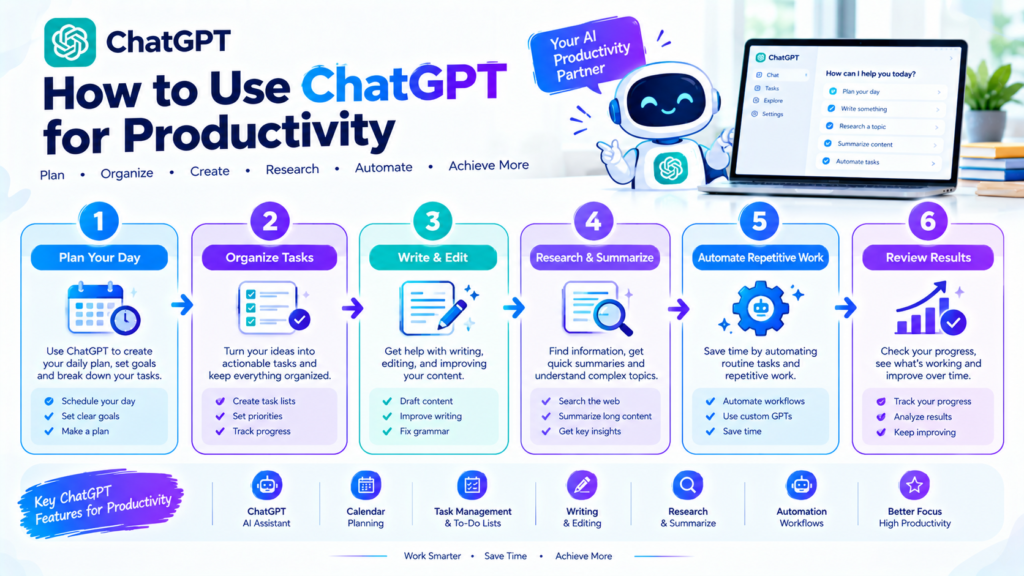
Here are some practical prompts you can reuse.
Daily Planning Prompt
“Here is my list of tasks for today: [TASKS]. Organize them by priority and create a realistic schedule based on my available time.”
Project Planning Prompt
“Break this project into small actionable steps: [PROJECT]. Organize the steps in the order they should be completed.”
Email Prompt
“Write a concise and professional email based on these points: [POINTS]. Keep the tone polite and clear.”
Summarization Prompt
“Summarize the following information into five key points and list the most important action items separately: [TEXT].”
Brainstorming Prompt
“Give me 15 practical ideas for [TOPIC]. Focus on useful ideas that can be implemented by a beginner.”
Editing Prompt
“Improve this text for grammar, clarity, and readability while keeping the original meaning: [TEXT].”
Common Mistakes When Using ChatGPT for Productivity
AI can improve productivity, but it can also become a distraction if used incorrectly.
Using ChatGPT for Everything
Not every task requires AI. Sometimes completing a simple task directly is faster.
Giving Vague Instructions
A prompt such as “Make me productive” does not provide enough context.
Give ChatGPT your goal, available time, tasks, and requirements.
Not Checking the Output
AI can make mistakes. Review important information before using it.
Creating Overly Complicated Workflows
A productivity system should make your work easier, not create additional work.
Spending Too Much Time Prompting
If a simple task takes five minutes manually but requires fifteen minutes of prompt adjustments, AI may not be the right solution for that task.
How to Use ChatGPT Without Losing Your Own Productivity
AI should support your productivity rather than become another distraction.
Set clear boundaries for how you use it.
For example, you can use ChatGPT for:
- Planning
- Drafting
- Summarizing
- Brainstorming
- Editing
Then return to your actual work.
Avoid constantly switching between your main task and AI tools unless the AI interaction is genuinely helping.
Final Thoughts
Learning how to use ChatGPT for productivity can help you organize your day, write faster, brainstorm ideas, summarize information, plan projects, and reduce repetitive work.
You can use ChatGPT as a daily planning assistant, writing helper, research partner, brainstorming tool, learning assistant, and project-planning companion.
The most effective approach is not to ask AI to do everything. Instead, identify the tasks that consume unnecessary time and use ChatGPT where it provides a practical advantage.
Give clear instructions, provide relevant context, review the results, and add your own judgment.
When used thoughtfully, ChatGPT can become a useful part of a productivity workflow while keeping you in control of the work and the final decisions.
Productivity is about making better use of your time, attention, and resources. However, modern work often involves emails, meetings, research, writing, planning, and repetitive tasks that can consume a large part of the day.
ChatGPT can act as an AI assistant for many of these activities. It can help you brainstorm ideas, organize tasks, create drafts, summarize information, build plans, and improve written content.
The goal is not to let AI make every decision for you. Instead, you can use ChatGPT to reduce repetitive work and make your workflow more organized.
In this guide, you will learn how to use ChatGPT for productivity, with practical examples that can be applied to work, studying, freelancing, content creation, and everyday tasks.
What Is ChatGPT?
ChatGPT is an AI assistant that can understand natural-language instructions and generate responses based on the information and instructions you provide.
For productivity, it can be used as a flexible assistant for tasks such as:
- Planning
- Writing
- Brainstorming
- Research
- Summarization
- Task organization
- Learning
- Content creation
- Data-related work
- Problem solving
Its usefulness depends heavily on the instructions and context you provide.
A clear prompt with specific requirements generally gives you a more useful starting point than a very vague request.
Why Use ChatGPT for Productivity?
There are several ways ChatGPT can support a productivity workflow.
Save Time
ChatGPT can help create first drafts, summaries, outlines, and ideas quickly.
Reduce Repetitive Work
If you frequently perform similar writing or organizational tasks, ChatGPT can help create reusable templates and workflows.
Organize Information
You can provide unstructured notes and ask ChatGPT to turn them into organized lists, tables, summaries, or action items.
Improve Writing
ChatGPT can help rewrite text, improve clarity, adjust tone, and identify areas that need improvement.
Generate Ideas
When you are stuck, ChatGPT can provide possible approaches, questions, topics, or starting points.
1. Use ChatGPT to Plan Your Day
One of the simplest ways to use ChatGPT for productivity is daily planning.
Start by creating a list of everything you need to accomplish.
For example:
- Answer emails
- Complete a report
- Research a topic
- Attend a meeting
- Write an article
- Review documents
Then provide the list to ChatGPT and explain your deadlines and priorities.
You can ask it to organize the tasks into a realistic daily schedule.
For example:
“I have six tasks to complete today. My most important deadline is at 4 PM. Create a realistic schedule with focused work sessions and short breaks.”
ChatGPT can give you a starting plan that you can then adjust according to your actual schedule.
2. Use ChatGPT to Create a To-Do List
A simple to-do list can become difficult to manage when it contains dozens of tasks.
ChatGPT can help organize your tasks into categories.
For example:
Urgent: Tasks that require immediate attention.
Important: Tasks that matter but have more flexibility.
Later: Tasks that can be completed at another time.
You can also ask ChatGPT to turn a large project into smaller tasks.
This makes a project easier to approach because you can focus on one step at a time.
3. Use ChatGPT for Time Management
Time management is another useful area for ChatGPT.
You can tell it how many hours you have available and provide your tasks.
For example:
“I have five hours available today. I need to write an article, answer emails, attend a meeting, and complete a report. Help me create a time-blocking schedule.”
ChatGPT can suggest a schedule based on the information you provide.
However, remember that an AI-generated schedule is only a suggestion. You should adjust it according to real deadlines, meetings, energy levels, and unexpected tasks.
4. Use ChatGPT to Write Emails Faster
Writing emails can take a surprising amount of time.
Instead of writing every email from scratch, you can give ChatGPT the key points and ask it to create a draft.
For example:
“Write a short professional email telling a client that the project will be completed two days later than originally planned. Keep the tone polite and transparent.”
ChatGPT can create a starting draft that you can review and personalize.
This is especially useful for repetitive business communication.
Always check the final email before sending it, particularly when it contains deadlines, commitments, pricing, or other important information.
5. Use ChatGPT for Content Creation
Bloggers and content creators can use ChatGPT throughout the content creation process.
A simple workflow can be:
Topic → Research Questions → Outline → Draft → Editing → SEO → Publishing
ChatGPT can assist with each stage.
For example, you can ask it to:
- Generate article ideas
- Create an outline
- Suggest headlines
- Write an introduction
- Improve paragraphs
- Generate FAQs
- Create social media ideas
- Rewrite content
However, adding your own expertise and original ideas is important. AI-generated content should be reviewed, edited, and fact-checked before publication.
6. Use ChatGPT for Brainstorming
Sometimes the hardest part of a task is getting started.
ChatGPT can act as a brainstorming partner.
For example, if you are creating a website about productivity, you can ask:
“Give me 20 blog topic ideas about AI and productivity for beginners. Focus on practical topics that solve everyday problems.”
You can then select the ideas that are most relevant to your audience.
You can also ask ChatGPT to develop one idea into several different content angles.
7. Use ChatGPT to Summarize Information
Long documents and large amounts of text can take considerable time to review.
When you have permission to process the material, ChatGPT can help summarize information you provide.
For example, you can ask for:
- A short summary
- Key points
- Action items
- Important questions
- A simplified explanation
- A structured outline
A useful prompt is:
“Summarize this document in five key points and list the action items separately.”
For important information, review the original document because summaries can omit context or details.
8. Use ChatGPT for Research
ChatGPT can be useful during the early stages of research.
You can use it to brainstorm:
- Research questions
- Subtopics
- Search terms
- Areas to investigate
- Possible explanations
For example, if you want to research AI in education, ChatGPT can help divide the subject into areas such as:
AI Study Tools → Personalized Learning → AI Tutors → Academic Research → Student Productivity → Challenges
This creates a useful research framework.
When accuracy matters, verify factual claims with reliable sources and consult original documents or authoritative references.
9. Use ChatGPT to Break Down Complex Projects
Large projects often become overwhelming because the final goal seems too big.
ChatGPT can help turn a large objective into smaller actions.
For example:
Launch a Blog
↓
Choose Niche
↓
Research Keywords
↓
Create Content Plan
↓
Write Articles
↓
Create Images
↓
Optimize SEO
↓
Publish
↓
Promote
Breaking the project into smaller steps makes it easier to track progress.
10. Use ChatGPT for Meeting Preparation
ChatGPT can also help prepare for meetings.
You can provide the meeting topic and ask it to generate:
- Questions to ask
- Topics to discuss
- Possible objections
- Talking points
- A meeting agenda
For example:
“Create a 30-minute meeting agenda for discussing a new website project. Include goals, priorities, deadlines, responsibilities, and next steps.”
This can help create a more structured meeting.
11. Use ChatGPT to Create Meeting Follow-Ups
After a meeting, you can use ChatGPT to organize notes that you provide.
For example, you can ask:
“Turn these meeting notes into a concise summary. Then create a separate list of action items with responsible people and deadlines.”
This transforms unstructured notes into something easier to follow.
Make sure the information you provide is appropriate to share with the AI service you are using, especially if it contains confidential business information.
12. Use ChatGPT for Learning
ChatGPT can also support learning and skill development.
You can ask it to explain a difficult concept at different levels.
For example:
“Explain search engine optimization to a complete beginner using simple examples.”
You can then ask follow-up questions or request practice exercises.
It can also help create:
- Study plans
- Practice questions
- Flashcards
- Quizzes
- Learning outlines
- Explanations
The goal should be to improve your understanding rather than simply obtain answers.
13. Create Reusable ChatGPT Prompts
If you perform the same task repeatedly, create a reusable prompt.
For example, a content creator could create a template like:
“Create a beginner-friendly article outline about [TOPIC]. Include an introduction, clear H2 sections, practical examples, FAQs, and a conclusion. Use simple English and avoid unnecessary repetition.”
Each time you have a new topic, replace [TOPIC] with the subject you want to cover.
Reusable prompts can reduce the time spent writing instructions repeatedly.
14. Use ChatGPT for Editing
You do not always need ChatGPT to write something from scratch.
It can also help improve your existing writing.
You can ask it to:
- Fix grammar
- Improve clarity
- Shorten paragraphs
- Make the tone more professional
- Remove repetition
- Improve transitions
- Simplify complex sentences
For example:
“Improve this paragraph for clarity while keeping the original meaning. Use simple professional English.”
This approach allows you to remain the primary writer while using AI as an editing assistant.
15. Use ChatGPT to Create a Weekly Plan
Daily planning is useful, but weekly planning can provide a broader view of your workload.
At the beginning of the week, list your major goals and deadlines.
Then ask ChatGPT to help organize them into smaller weekly tasks.
For example:
Monday: Research
Tuesday: Writing
Wednesday: Editing
Thursday: Project work
Friday: Review and completion
The exact schedule should depend on your responsibilities and deadlines.
16. Use ChatGPT With Other Productivity Tools
ChatGPT does not have to be your entire productivity system.
You can combine it with task managers, calendars, note-taking applications, and automation platforms.
For example:
ChatGPT → Create Task List → Task Manager → Calendar → Reminder
You can use ChatGPT to organize information and then move the final tasks into the productivity application you already use.
This prevents your workflow from becoming dependent on one tool.
A Simple ChatGPT Productivity Workflow
A practical workflow can look like this:
Capture → Organize → Plan → Execute → Review
Capture
Write down your tasks, ideas, notes, and responsibilities.
Organize
Ask ChatGPT to categorize or structure the information.
Plan
Create a realistic schedule based on deadlines and available time.
Execute
Work on your highest-priority tasks.
Review
At the end of the day, check what you completed and what needs to move forward.
This simple workflow can be adapted to work, study, freelancing, or personal projects.
Best ChatGPT Prompts for Productivity
Here are some practical prompts you can reuse.
Daily Planning Prompt
“Here is my list of tasks for today: [TASKS]. Organize them by priority and create a realistic schedule based on my available time.”
Project Planning Prompt
“Break this project into small actionable steps: [PROJECT]. Organize the steps in the order they should be completed.”
Email Prompt
“Write a concise and professional email based on these points: [POINTS]. Keep the tone polite and clear.”
Summarization Prompt
“Summarize the following information into five key points and list the most important action items separately: [TEXT].”
Brainstorming Prompt
“Give me 15 practical ideas for [TOPIC]. Focus on useful ideas that can be implemented by a beginner.”
Editing Prompt
“Improve this text for grammar, clarity, and readability while keeping the original meaning: [TEXT].”
Common Mistakes When Using ChatGPT for Productivity
AI can improve productivity, but it can also become a distraction if used incorrectly.
Using ChatGPT for Everything
Not every task requires AI. Sometimes completing a simple task directly is faster.
Giving Vague Instructions
A prompt such as “Make me productive” does not provide enough context.
Give ChatGPT your goal, available time, tasks, and requirements.
Not Checking the Output
AI can make mistakes. Review important information before using it.
Creating Overly Complicated Workflows
A productivity system should make your work easier, not create additional work.
Spending Too Much Time Prompting
If a simple task takes five minutes manually but requires fifteen minutes of prompt adjustments, AI may not be the right solution for that task.
How to Use ChatGPT Without Losing Your Own Productivity
AI should support your productivity rather than become another distraction.
Set clear boundaries for how you use it.
For example, you can use ChatGPT for:
- Planning
- Drafting
- Summarizing
- Brainstorming
- Editing
Then return to your actual work.
Avoid constantly switching between your main task and AI tools unless the AI interaction is genuinely helping.
Final Thoughts
Learning how to use ChatGPT for productivity can help you organize your day, write faster, brainstorm ideas, summarize information, plan projects, and reduce repetitive work.
You can use ChatGPT as a daily planning assistant, writing helper, research partner, brainstorming tool, learning assistant, and project-planning companion.
The most effective approach is not to ask AI to do everything. Instead, identify the tasks that consume unnecessary time and use ChatGPT where it provides a practical advantage.
Give clear instructions, provide relevant context, review the results, and add your own judgment.
When used thoughtfully, ChatGPT can become a useful part of a productivity workflow while keeping you in control of the work and the final decisions.