
Productivity is not simply about working longer hours. It is about using your available time and energy effectively to complete important tasks.
In 2026, artificial intelligence has become a useful assistant for many everyday productivity tasks. AI can help people organize information, create plans, write content, summarize documents, manage tasks, generate ideas, and automate repetitive work.
Whether you are a student, freelancer, remote worker, professional, blogger, or small business owner, AI can help you create a more efficient workflow.
The key is to use AI strategically. Instead of asking AI to do everything, use it for tasks that save time while keeping yourself responsible for important decisions and final results.
In this guide, you will learn how to use AI for productivity, including practical examples, useful workflows, and tips for getting better results.
What Does AI Productivity Mean?
AI productivity means using artificial intelligence to complete or support tasks more efficiently.
Traditional productivity systems often require you to manually organize tasks, write documents, summarize information, and perform repetitive activities.
AI can assist with some of these tasks.
For example, you can use AI to:
- Create a daily to-do list
- Organize tasks
- Write and edit documents
- Summarize long information
- Generate ideas
- Create meeting summaries
- Research topics
- Plan projects
- Automate repetitive workflows
- Draft emails
- Analyze information
AI does not necessarily make every task faster. The biggest benefit comes from identifying repetitive or time-consuming activities where AI can provide useful assistance.
Why Use AI for Productivity?
There are several reasons people are using AI as part of their productivity systems.
1. Save Time
AI can help complete repetitive tasks quickly. Instead of spending a long time creating a basic draft or summary, you can generate a starting point and then improve it.
2. Reduce Repetitive Work
Many daily tasks involve repetitive actions. AI and automation tools can reduce some of this manual work.
3. Organize Information
AI can help turn unstructured notes, ideas, and information into organized lists or summaries.
4. Improve Writing
AI writing assistants can help with grammar, clarity, structure, brainstorming, and rewriting.
5. Make Planning Easier
AI can help break large projects into smaller steps and create possible schedules.
6. Overcome Writer’s Block
When you do not know how to start a document, AI can generate ideas or an outline that gives you a starting point.
How to Use AI for Productivity
You do not need a complicated system to start using AI. Begin with everyday tasks where you regularly spend time.
1. Use AI to Plan Your Day
One simple way to use AI is to create a daily plan.
Give the AI your list of tasks and explain which ones are urgent or important.
For example, you might have:
- Answer emails
- Write an article
- Attend a meeting
- Complete a project
- Review documents
- Exercise
You can ask AI to organize these tasks into a realistic schedule.
However, treat the AI-generated schedule as a suggestion. You should adjust it according to your actual deadlines, energy levels, and responsibilities.
2. Use AI to Create To-Do Lists
A long list of tasks can feel overwhelming.
AI can help organize tasks into categories such as:
High Priority
Tasks that need immediate attention.
Medium Priority
Important tasks that can be completed later.
Low Priority
Tasks that are useful but not urgent.
This makes it easier to decide what deserves your attention first.
3. Use AI for Writing
Writing can consume a significant amount of time.
AI can help create first drafts, outlines, headlines, emails, reports, and other written content.
For example, instead of starting an email from a blank page, you can provide the key points and ask AI to create a professional draft.
You should still review the result before sending it.
AI is most useful as a writing assistant that helps you get started and improve your workflow.
4. Use AI to Summarize Information
Professionals and students often need to process large amounts of information.
AI can help summarize:
- Meeting notes
- Articles
- Reports
- Documents
- Research material
- Long messages
A summary can help you quickly understand the main points before deciding whether you need to read the complete material.
For important information, always review the original source rather than relying entirely on an AI summary.
5. Use AI for Research
Research is another area where AI can save time.
You can use AI to brainstorm questions, identify subtopics, organize research ideas, and explain difficult concepts.
For example, if you are researching digital marketing, you can ask AI to divide the subject into areas such as:
- SEO
- Content marketing
- Social media
- Email marketing
- Paid advertising
- Analytics
This creates a structured starting point for deeper research.
When factual accuracy matters, verify information using reliable and original sources.
6. Use AI to Break Down Large Projects
Large projects can become difficult when you only look at the final goal.
AI can help break a project into smaller steps.
For example:
Create a Blog → Research Topic → Create Outline → Write Draft → Edit → Add Images → Optimize SEO → Publish
Instead of thinking about the entire project at once, you can focus on one step at a time.
This approach can make complex work easier to manage.
7. Use AI for Email Management
Email can take a significant amount of time during the workday.
AI can help draft replies, summarize long conversations, and organize information.
For example, you can provide the key points of an email and ask AI to create a short professional response.
This can be especially useful when you need to write similar types of messages repeatedly.
Always review AI-generated emails before sending them, especially when the message contains important commitments or sensitive information.
8. Use AI for Meeting Productivity
Meetings often generate large amounts of information.
AI-powered meeting tools can help with tasks such as:
- Transcribing conversations
- Creating summaries
- Identifying action items
- Organizing meeting notes
- Creating follow-up tasks
A useful workflow is:
Meeting → Transcript → Summary → Action Items → Task List
This can make it easier to remember what needs to happen after a meeting.
9. Use AI for Time Management
AI productivity tools can help you manage calendars, tasks, deadlines, and schedules.
Some AI-powered productivity platforms can suggest schedules based on your tasks and available time.
You can also use AI to create a simple time-blocking plan.
For example:
9:00–10:00: Research
10:00–11:30: Writing
11:30–12:00: Email
1:00–2:30: Project Work
3:00–3:30: Review
The goal is not to schedule every minute. Leave enough flexibility for unexpected tasks.
Best AI Productivity Tasks to Automate
Automation can be one of the most useful applications of AI.
You can automate repetitive workflows such as:
- Creating tasks from forms
- Sending notifications
- Organizing information
- Moving data between applications
- Generating routine reports
- Updating spreadsheets
- Creating reminders
Platforms such as Zapier can connect different applications and create automated workflows.
For example:
New Form Submission → Create Task → Send Notification → Add Data to Spreadsheet
Once configured, the workflow can perform these repetitive steps automatically.
Use AI for Content Creation
Content creators can use AI throughout the content production process.
A basic workflow could look like:
Idea → Research → Outline → Draft → Editing → SEO → Publishing
AI can assist with each stage.
For example, it can generate topic ideas, organize an outline, suggest headlines, improve sentences, and create content variations.
However, original human input remains important. Adding your own expertise, examples, experiences, and insights can make the final content more useful.
Use AI for Learning and Studying
Students can also use AI to improve productivity.
AI can help students:
- Create study plans
- Explain difficult concepts
- Generate practice questions
- Summarize notes
- Create flashcards
- Organize assignments
- Brainstorm project ideas
For example, a student can provide a list of upcoming exams and assignments and ask AI to create a weekly study plan.
AI should support learning rather than replace it. Students should understand the material themselves and follow their school’s or institution’s rules regarding AI use.
Use AI for Personal Productivity
AI productivity is not limited to work.
You can also use AI to organize personal activities.
For example:
- Meal planning
- Travel planning
- Personal schedules
- Shopping lists
- Goal planning
- Habit tracking
- Event planning
The same basic principle applies: use AI to reduce unnecessary planning work while keeping control over important decisions.
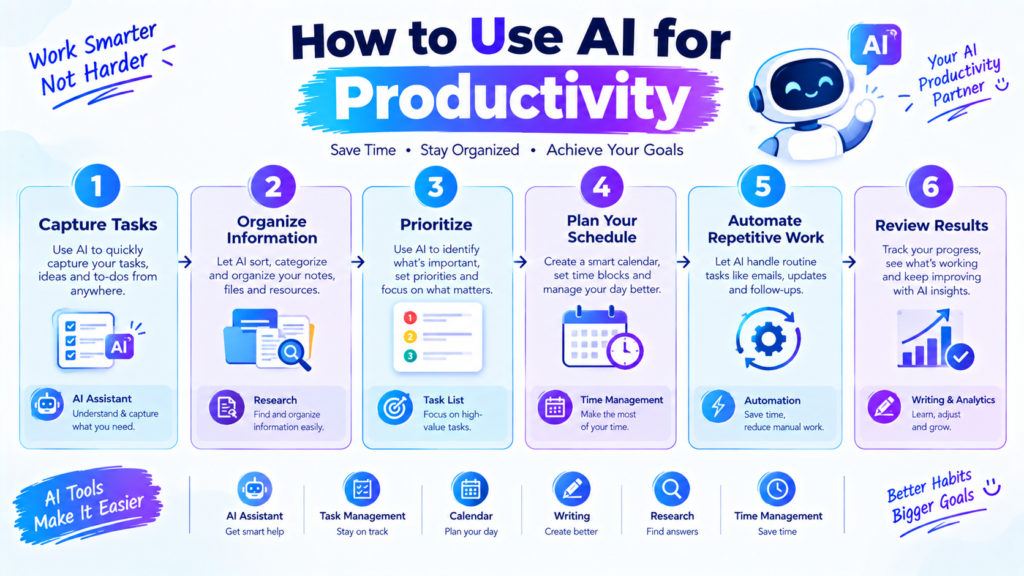
Create an AI Productivity Workflow
A simple AI productivity workflow can be divided into five stages.
Stage 1: Capture
Write down tasks, ideas, notes, and information.
Stage 2: Organize
Use AI to categorize information and identify priorities.
Stage 3: Plan
Create a realistic schedule based on deadlines and available time.
Stage 4: Execute
Focus on completing the most important tasks.
Stage 5: Review
At the end of the day or week, review what was completed and adjust your plan.
This creates a simple cycle:
Capture → Organize → Plan → Execute → Review
How to Write Better AI Prompts for Productivity
The quality of AI output often depends on the instructions you provide.
Instead of writing:
“Make me productive.”
Give the AI more context.
For example:
“I have five tasks to complete today. My most important deadline is at 4 PM. Create a realistic schedule with focused work periods and short breaks. Do not schedule more than three major tasks before lunch.”
This gives the AI a clearer understanding of your situation.
A useful productivity prompt can include:
- Your goal
- Your tasks
- Deadlines
- Available time
- Priority level
- Desired format
- Limitations
Common AI Productivity Mistakes
AI can improve productivity, but using it incorrectly can have the opposite effect.
Using Too Many Tools
You do not need ten productivity applications.
Using too many platforms can make your workflow more complicated.
Start with one or two tools and expand only when necessary.
Trusting AI Without Checking
AI can produce incorrect information. Always review important facts, calculations, summaries, and recommendations.
Automating Everything
Not every task needs automation. Sometimes a simple manual process is faster than building a complicated automated workflow.
Poor Prompts
Vague instructions often produce generic results.
Give AI enough context to understand what you actually need.
Spending More Time Optimizing Than Working
Productivity tools should help you complete work. Do not spend hours designing a perfect productivity system while important tasks remain unfinished.
Tips for Using AI More Productively
Follow these simple principles:
- Start with repetitive tasks.
- Use AI to create first drafts.
- Give clear instructions.
- Break large projects into smaller steps.
- Automate repetitive workflows.
- Keep your task system simple.
- Verify important information.
- Protect confidential information.
- Add your own judgment and creativity.
- Review your productivity system regularly.
Is AI Really Good for Productivity?
AI can be useful for productivity, but its value depends on how it is used.
If AI creates additional complexity, requires constant corrections, or encourages unnecessary work, it may not improve productivity.
The best use cases are usually tasks where AI can provide a meaningful advantage, such as summarizing information, generating a starting draft, organizing large amounts of text, or automating repetitive processes.
Productivity is ultimately about accomplishing meaningful goals, not simply completing more tasks.
Final Thoughts
Learning how to use AI for productivity can help you save time, organize information, manage tasks, improve writing, and automate repetitive activities.
AI can assist with daily planning, email writing, research, meeting summaries, project management, content creation, studying, and many other tasks.
You do not need a complicated AI system to get started. Choose one repetitive or time-consuming task and use AI to improve that part of your workflow.
As you become comfortable, you can gradually introduce automation and other AI productivity tools.
The most effective approach is to combine AI assistance with human judgment. Let AI handle suitable repetitive tasks while you remain responsible for decisions, accuracy, creativity, and the final result.
When used thoughtfully, AI can become a practical productivity assistant rather than another source of digital distraction.