
Artificial intelligence has become one of the most useful technologies for everyday digital work. From writing and research to image creation, productivity, learning, and business tasks, AI tools can help people complete many activities faster.
The good news is that you do not always need to pay for an expensive AI subscription. In 2026, many popular AI platforms offer free plans or free versions that provide useful features for everyday users.
Free AI tools can be especially helpful for students, freelancers, content creators, professionals, small business owners, and anyone who wants to experiment with artificial intelligence without making a large investment.
However, free does not always mean unlimited. Many AI services place limits on usage, advanced features, storage, or the number of requests available each day or month.
In this guide, we will look at some of the best free AI tools in 2026 and explain what you can use them for.
What Are Free AI Tools?
Free AI tools are applications or online services that provide artificial intelligence features without requiring users to purchase a paid subscription.
Some platforms are completely free, while others use a freemium model. This means basic features are available for free, but advanced capabilities require a paid plan.
Free AI tools can help with many different tasks, including:
- Writing and editing
- Research
- Summarizing information
- Creating images
- Generating ideas
- Taking notes
- Studying
- Creating presentations
- Managing tasks
- Automating repetitive work
The exact features available in a free plan can change over time, so it is important to check the current terms of each service before relying on a particular feature.
Why Use Free AI Tools in 2026?
There are several reasons why people are turning to free AI tools.
First, they allow beginners to experiment with artificial intelligence without paying for a subscription.
Second, free tools can be useful for people who only need AI occasionally.
For example, someone might use an AI assistant to write an email once or twice a week rather than needing unlimited access.
Free AI tools can also help students and freelancers who want to improve productivity while keeping their expenses low.
Another advantage is that trying free versions allows you to understand whether a tool actually fits your workflow before deciding whether a paid plan is necessary.
Best Free AI Tools in 2026
1. ChatGPT
ChatGPT is one of the most versatile AI assistants available.
Its free access can be useful for brainstorming, writing, summarizing, learning, planning, and many everyday tasks.
You can use an AI assistant to create an article outline, improve a paragraph, explain a complicated concept, generate ideas, create a checklist, or help organize information.
Students can use it as a learning assistant, while freelancers can use it for proposals, emails, brainstorming, and content planning.
One important point is that free access can have usage limits and feature restrictions. The exact limits may change as the service evolves.
2. Google Gemini
Google Gemini is another popular AI assistant that offers free access.
It can help with brainstorming, writing, research, summarization, explanations, and other everyday tasks.
For people already using Google’s ecosystem, Gemini can be a convenient option for AI-assisted work.
You can use it to generate ideas, understand topics, create drafts, and organize information.
Like many AI services, some advanced capabilities may be available only through paid plans.
3. Microsoft Copilot
Microsoft Copilot provides AI assistance for a variety of everyday tasks.
It can help users generate text, brainstorm ideas, summarize information, and perform other AI-assisted activities.
It can be particularly useful for people who already use Microsoft products as part of their daily work.
Instead of learning a completely different productivity environment, users can incorporate AI assistance into familiar Microsoft workflows.
Free availability and features can vary depending on the specific Copilot experience and Microsoft account or product being used.
4. Canva
Canva is a popular design platform that also provides AI-powered features.
Its free plan allows users to create many types of visual content, while selected AI features may be available with usage limits.
You can use Canva to create:
- Blog graphics
- Social media posts
- Presentations
- Posters
- Infographics
- Simple marketing designs
AI-assisted design can be especially useful for beginners who do not have advanced graphic design experience.
For bloggers and content creators, Canva can help turn written ideas into visual content more quickly.
5. Grammarly
Grammarly is a popular writing assistant that can help improve written communication.
Its free features can assist with grammar, spelling, punctuation, and basic writing improvements.
This makes it useful for emails, blog posts, assignments, professional messages, and everyday writing.
AI-powered writing assistance can help identify areas that need improvement, but users should still review suggestions themselves.
Your writing should continue to reflect your own ideas, voice, and intended meaning.
6. Perplexity
Perplexity is an AI-powered search and research platform that can help users explore topics through conversational questions.
It can be useful when you want to understand a subject, find relevant information, or explore multiple aspects of a question.
Instead of manually opening many search results, users can interact with an AI-powered research interface and ask follow-up questions.
However, AI-generated answers should not automatically be treated as authoritative. For important research, verify facts using reliable primary or official sources.
7. QuillBot
QuillBot provides AI-powered writing tools that can help users rewrite and improve text.
It can be useful for paraphrasing, summarizing, and making writing clearer.
Students, bloggers, and professionals may find these features useful when working with drafts.
However, paraphrasing tools should be used responsibly. Rewriting text does not automatically make copied material original, and proper attribution should still be provided when using someone else’s ideas or work.
8. Notion
Notion provides a workspace for notes, documents, tasks, databases, and project organization.
Its free plan can be useful for individuals who want to organize their digital work in one place.
Notion can be used for:
- Personal notes
- Project planning
- Content calendars
- Task lists
- Documentation
- Goal tracking
Some AI capabilities may be subject to separate usage limits or paid plans, but the basic workspace can still be valuable for productivity.
9. Adobe Express
Adobe Express provides tools for creating graphics, social media content, presentations, and other visual materials.
It also includes AI-powered features, with availability depending on the current plan and feature set.
For people who need simple designs without using complex professional design software, Adobe Express can be a useful option.
It can help create social media posts, promotional graphics, flyers, and other digital content.
10. Otter.ai
Otter.ai is known for AI-powered transcription and meeting assistance.
Its free access can be useful for users who need to turn conversations or meetings into searchable text.
This can be useful for:
- Online meetings
- Interviews
- Lectures
- Research discussions
- Team conversations
Free plans typically have usage limits, so users with frequent or lengthy meetings may eventually need a paid plan.
Best Free AI Tools by Category
Instead of choosing tools randomly, it can help to organize them according to the task you want to complete.
Free AI Tools for Writing
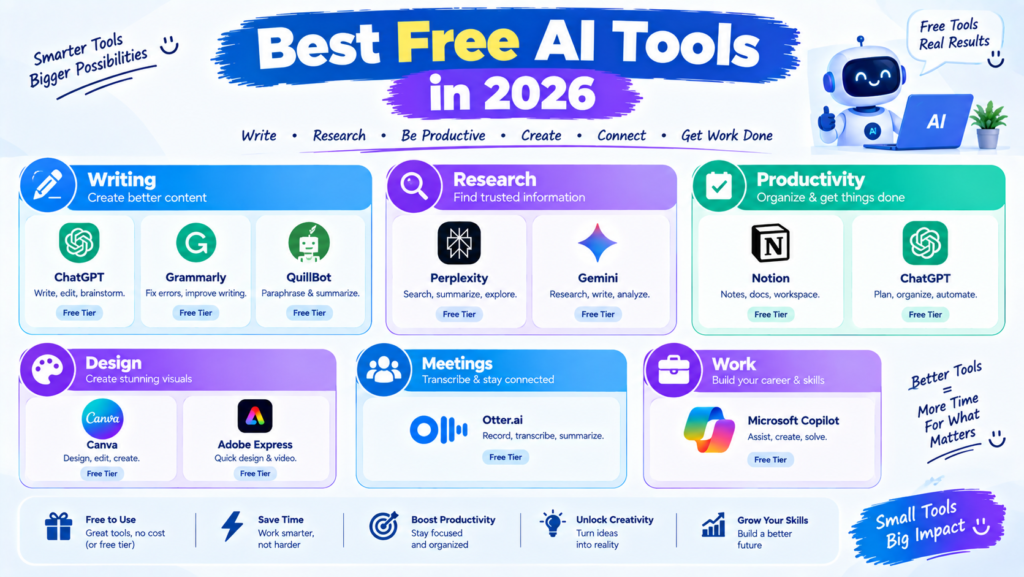
For writing and editing, tools such as ChatGPT, Grammarly, and QuillBot can provide useful assistance.
They can help with brainstorming, grammar, rewriting, summaries, and first drafts.
Free AI Tools for Research
AI assistants and AI search platforms such as Gemini, ChatGPT, and Perplexity can help users explore topics and organize information.
Always verify important facts before publishing or using them professionally.
Free AI Tools for Design
Canva and Adobe Express can help beginners create graphics, presentations, social media content, and other visual materials.
Free AI Tools for Productivity
ChatGPT, Notion, Gemini, and other AI-powered productivity platforms can help with planning, organization, brainstorming, and task management.
Free AI Tools for Meetings
Otter.ai can help users transcribe and review conversations, although free usage may be limited.
How to Choose the Best Free AI Tool
With so many options available, choosing an AI tool can feel overwhelming.
The easiest approach is to start with your specific problem.
If you need help writing, choose a writing assistant.
>If you need research support, try an AI search or research platform.
>If you create graphics, explore a design platform with AI features.
>If you need better organization, try an AI-powered workspace or productivity application.
Do not choose a tool simply because it is popular. Choose one that fits the task you actually need to complete.
Check Free Plan Limitations
Before building your entire workflow around a free AI tool, check its current limitations.
A free plan may restrict:
- Number of AI requests
- Advanced models
- Image generation
- File uploads
- Storage
- Export options
- Automation features
These limitations can change, so always check the provider’s current pricing and plan information.
Tips for Using Free AI Tools Effectively
Use AI as an Assistant
AI can help you work faster, but it should not replace your own judgment.
Use it to generate ideas, organize information, create drafts, and handle repetitive tasks.
Verify Important Information
AI systems can sometimes produce incorrect or outdated information.
For important work, verify facts using trustworthy sources.
Avoid Sharing Sensitive Data
Do not enter passwords, confidential business information, private customer data, or other sensitive information into an AI tool unless you understand how the service handles that information and have appropriate permission.
Compare Different Tools
You do not have to use one AI tool for everything.
You may find that one platform is better for writing while another works better for research or design.
Try different free options and identify which ones fit your workflow.
Are Free AI Tools Good Enough?
For many everyday tasks, free AI tools can be more than enough.
If you need occasional help with writing, brainstorming, research, studying, design, or organization, a free plan may provide everything you need.
Paid plans become more relevant when you require higher usage limits, advanced models, additional features, larger file support, or business-oriented capabilities.
The right choice depends on how frequently you use AI and what features you need.
Final Thoughts
The best free AI tools in 2026 give users an opportunity to benefit from artificial intelligence without immediately paying for expensive subscriptions.
Tools such as ChatGPT, Gemini, Microsoft Copilot, Canva, Grammarly, Perplexity, QuillBot, Notion, Adobe Express, and Otter.ai can assist with different areas of writing, research, productivity, design, and communication.
However, there is no single tool that is perfect for everyone.
Start with your specific productivity problem, choose a free tool that addresses it, and learn how to use it effectively. As your needs grow, you can decide whether additional tools or paid features are necessary.
The most important thing is not how many AI tools you use. It is how effectively you use the right tool to save time, improve your workflow, and complete meaningful work.